
Featured Products
-
Sale!

-
Sale!

-
Sale!

-
Sale!

-
Sale!

-
Sale!

-
Sale!

-
Sale!


Color Inc Pro Lab is who I use for my printing. I love the way my prints look true to life. And I have received amazing customer service. I contacted them to see if they would be a guest on my blog. They have agreed to do periodic articles teaching you more about printing.
Today’s article will educate you on some basics of Color Management and Color Profiles.
Also read at the bottom for an exclusive code for new customers.

Color Management Basics by Color Inc Pro Lab
Color Management is one of these headache-inducing struggles that early photographers face. How do you ensure that color in a print, will match color on a monitor? Luckily, with the proper tools and a little bit of effort, you can get pretty accurate colors between your images and prints.
The most important part of color management deals with your computer monitor. Invest in a monitor calibration kit, such as an eye-one display 2 (X-Rite) or Spyder 2 (ColorVision). For instance, Color Incorporated sells the eye-one display 2 for just $240.00 These devices hang from your monitor and measure its output, in order to suggest proper monitor settings and color values. They usually create monitor color profiles you can use as well.
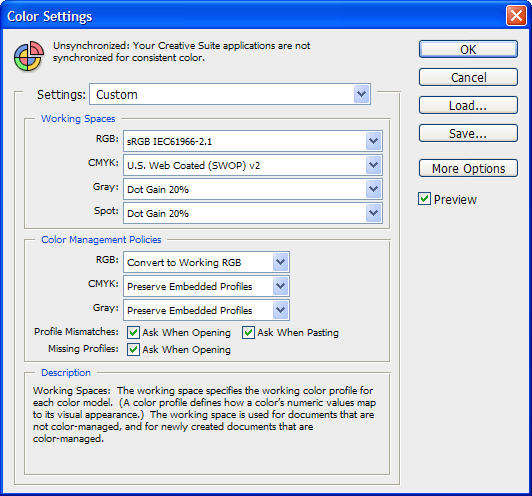
Additionally, you can use tools such as Adobe Photoshop to enforce color management. Simply select “Edit-> Color Settings” (see attached screenshot). This will instruct photoshop to display images in sRGB (Working Space), and alert you if you open a non-RGB profiled image.
Getting color managed takes some time and effort. If your busy, or just want someone else to handle the color for you, you can opt for additional service, such as ColorInc’s color correction and artwork services. ColorInc’s Color Corrected Proofs are only 39 cents each.
These tools are important, because color space (such as sRGB) offer different colors. For instance, most cameras take photos in color spaces larger than sRGB (such as Adobe RGB). However, because printers do not print all of the colors that Adobe RGB contains, you can run into color management issues where a photo you have, contains a color that can’t be printed.
Sticking to calibrated equipment and profiles helps alleviate this issue, by only allowing specific colors that are within print range. This should keep your colors matched, and photos looking great!
_________________________________________________
Now for the code. If you are new to Color Inc Pro Labs, you can get 50% off your 1st order.
The Promo Code is 058first.
Our website is http://www.colorincprolab.com/
and new customers can sign up at

No Comments
Leave a Comment
You must be logged in to post a comment.




















Recent Posts









This was very helpful and informative. I’ve been confused about which color space to use. After reading Scott Kelby, he always suggests Adobe RGB, but this post confirmed the other statements I’ve been hearing about using sRGB. Thanks for posting this!
I have consistently used sRGB and I am happy. I will point out one tip for Mac users – my recent color calibration headaches were connected to Color Profile issues. Open Color Sync Utility > Profile First Aid > Verify. Repair if necessary by clicking… Repair! You may be surprised what little bugs were in your profiles! Before I do any screen proofing, I try to remember to run this repair to be sure the profiles are working properly.
Great post! I’ve been researching this topic lately. Can you comment on ICC profiles and how they are used?
This has been really helpful! Thank you!
Great post, thanks for the info