
Featured Products
-
Sale!

-
Sale!

-
Sale!

-
Sale!

-
Sale!

-
Sale!

-
Sale!

-
Sale!


MCP Actions Website | MCP Flickr Group | MCP Reviews
I get a lot of questions from customers about what to do when Photoshop starts acting like it is in control. I am going to be posting some frequent asked questions from MCP Actions customers and blog visitors. If you have a quick question about Photoshop you want answered, please email me and I may use it in a future blog entry. If you have lots of questions on lengthier topics, please contact me for details on my MCP one on one training.
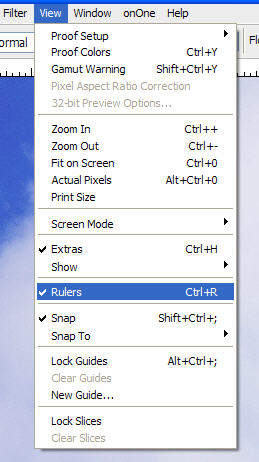
Question: “Why are there rulers around my photo? I do not want them.”
Answer: To get rid of rulers, go under “view” and click on rulers to uncheck. If you want rulers and they are not showing, then check it off instead.

Posted in Photoshop Tips





















Recent Posts








