
Featured Products
-
Sale!

-
Sale!

-
Sale!

-
Sale!

-
Sale!

-
Sale!

-
Sale!

-
Sale!


“High Key” is often confused with a purposely blown out white backdrop. High Key is where the highlights and light tones make up most or all of the image. If your background is white, ivory, cream or light in color and the subject is too, you have “high key”
I rarely do high key, though many ask how I do it. What they really want to know is how I shoot that more commercial crisp white backdrop with bright bold color subjects. When you blow out the backdrop so that your RGB numbers all read 255, that is called “hot white.” This is actually what most people want to know how to do and what I will cover here.
I recommend a minimum of 3 lights and a reflector or 4 lights. I use Alien Bees (I have 2 400s and 2 800s).
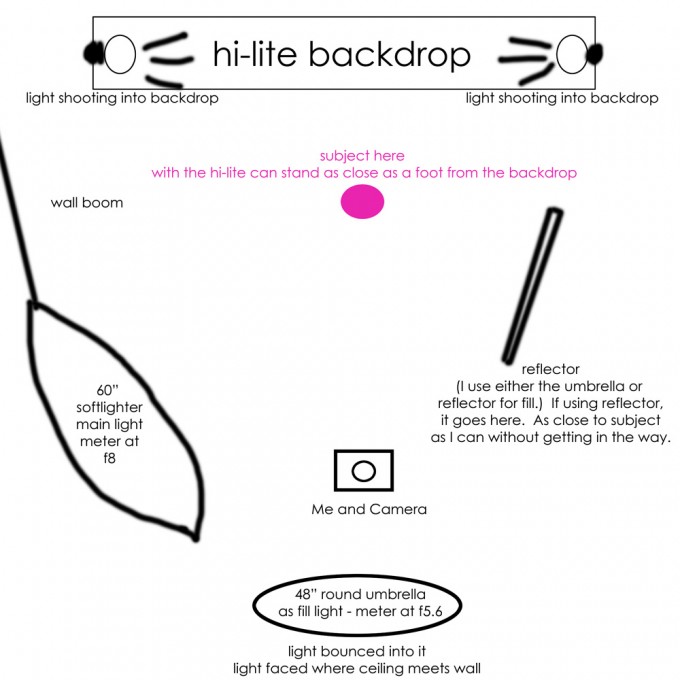
My room is unusually small for this type of photography (11×13) and it is hard to achieve this look in a small space as the light bounces everywhere. But it can be done. Up until I recently purchased a lastolite hi-lite backdrop, I used a white paper backdrop. In my diagram below, if you are using paper, you would want your lights about 3 feet from the backdrop pointing at it (versus how I show my setup below). You would want your subject another 3-4 feet or further away from where your stands are. You can now see how I ran out of room once my kids grew a bit.
The rest of your setup could be similar. I use a wall boom to conserve space and to increase flexibility. When I do product photography I like to have the light right over my subjects and this setup allows for that. I have my main light in a softlighter (I use to have a photoflex softbox – anyone want to buy it?) My fill light is in back of where I stand. Light bounces toward the corner of ceiling meeting the wall into an umbrella. I either use this of a big circular reflector. I show both below.
I hope this explained things well for you.
You can see some photos taken with this setup in one of my blog entries by clicking here.

No Comments
Leave a Comment
You must be logged in to post a comment.




















Recent Posts









Thanks for the diagram Jodi!!!
thank you for this lesson, especially the diagram jodi!!
Thanks, Jodi, you’re amazing!!! blessings on all your hard work!
Jodi, can you do a studio setup shot? Never hear of a lastolite hi-lite backdrop. What size did you get?
Thanks everyone – I wish I could Lori – but my studio is too small. I honestly am only using it once every few months now anyway. The diagram should help – and I use to use paper and backed the lights away more from the backdrop – that is the only real difference between using the hi-lite versus paper. I have the large lastolite – I cannot remember the size – 6×7 feet maybe… Going off the top of my head.
Thanks Jodi.