
Featured Products
-
Sale!

-
Sale!

-
Sale!

-
Sale!

-
Sale!

-
Sale!

-
Sale!

-
Sale!


I get a lot of questions from customers about what to do when Photoshop starts acting like it is in control. I am going to be posting some frequent asked questions from MCP Actions customers and blog visitors.
If you have a quick question about Photoshop you want answered, please email me and I may use it in a future blog entry. If you have lots of questions on lengthier topics, please contact me for details on my MCP one on one training.
Question: “My actions are not working right. They worked correctly before. What did I do wrong and how can I fix them?”
Answer: It depends what problems you are having. Here are two areas I often get asked about:
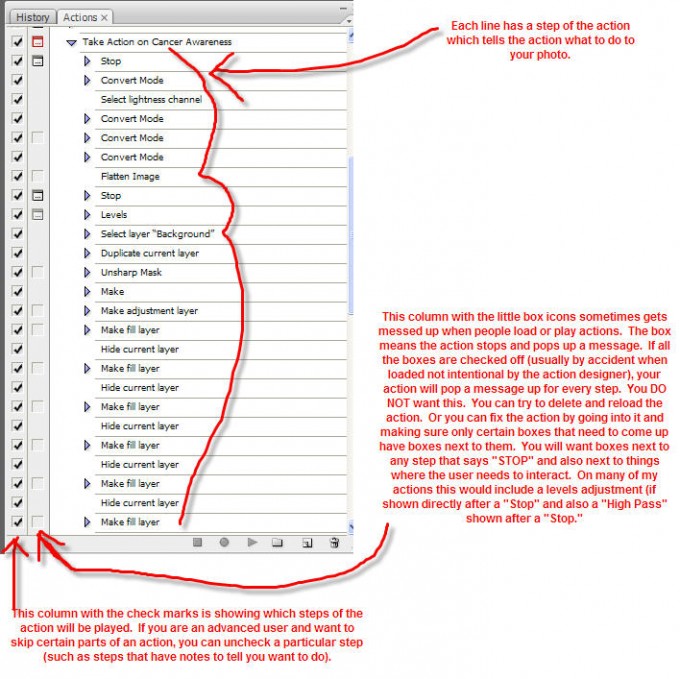
1 – The action pops up boxes for adjustments on every single step of the action. Here is what you can do to fix this problem.
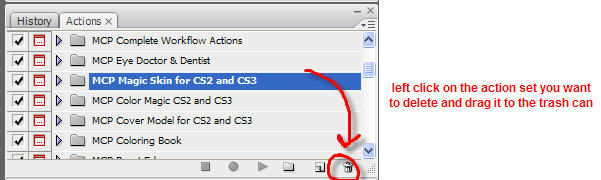
2 – The action is not working right at all. If this happens, it is time to delete the action as shown below. And reinstall using your original action that you downloaded and saved. To load an action, see my Video on Installing and Using Actions.

No Comments
Leave a Comment
You must be logged in to post a comment.




















Recent Posts









That’s a great help! That hasn’t happened to me yet but it might and I never knew what the check marks meant!
Thank you so much, now I know what those check marks are used for.:)
Thanks for the tips. But I still have a problem. I just got CS4 and the default actions are having problems with the first problem you discussed above. I tried reinstalling CS4, but they still don’t work. So what I see are the little icons in the box next to the check mark box. And when I try applying them to a picture they do as you say, a message pops up for every step of the action, but most often saying that that particular step is not available at this time. Any help would be much appreciated.
If you are having a problem with the actions that come with CS4 – the default ones – you need to contact adobe directly and they can help you. If the actions you purchase from me where to run into a glitch – I support those directly.Thank you – and good luck. Enjoy CS4.Jodi
I have tried to delete ALL my actions and reload them. They are still not working. The play button is NOT highlighted. What did I do wrong and how can I get them to work and avoid this in the future?Thank you so much in advance for your help.Terrie
please contact our help desk for assistance: http://mcpactions.freshdesk.com
Thank you, exactly what I needed to know! Great posts, as always.
I sent a helpdesk but left out important info. The touch of light/dark is no longer working. The play function seems to work; however, when I am on my photo, with the brush, as I had been doing all day, it is no longer lightening or darkening. I also started having this issue with the Eye Dr./Dentist set. I was working for a couple hours just fine with these actions. I have deleted them and reloaded them and they still aren’t working properly. I appreciate any suggestions.
sounds like your brush is not set to normal anymore. switch it back and you should be fine.
Hi, I would like to ask you.. I have a photoshop CS6 and I would like to load some actions in and I have downloaded some actions but when I go to photoshop, press actions, then menu bar , my button LOAD ACTIONS is not highlighted . ?? why?? can you help me with that?? thank you very much , regards Magda
This worked!! I have a new Macbook and the imported actions were requiring me to continuously hit return, which was driving me bananas. Thanks for the great photo explaining that.
I need help making my first image layer. I need to convert it to the background layer without naming it. When I rename it BACKGROUND it doesn’t work properly. When I go to layer and choose layer to background it comes up layer o (unlocked). Does this make sense?Hopefully you can help me
The check boxes were throwing me off majorly. Thank you so much!
HI, I am creating a main action with my other actions in PS and use it to match the look of all images I take in a shoot. They were working perfectly a few days ago. Today I tried to make a new main Action but I have problems with: “The object layer background is not currently available” and “merge layers”. I reinstaled the actions and deleted the settings file but they are still not working. What can I do ?