
Featured Products
-
Sale!

-
Sale!

-
Sale!

-
Sale!

-
Sale!

-
Sale!

-
Sale!

-
Sale!


APRIL FOOLS!
Well the April Fools’ joke is that there are no new free actions. But I have compiled many of my past free “try me” actions here in this post. So if you are new to MCP or just have not already downloaded them, here they are. ENJOY!
These actions have simple built in instructions rather than the extensive tutorials that accompany my actions for sale. Sample these actions to see how MCP can enhance your photography.
VIDEO: HOW TO INSTALL & USE ACTIONS.
High Definition Sharpening & Crystal Clear Web Resize and Sharpening (with built in instructions).
Magic Blog It Board Action (compatible with CS2 & up) (PDF instructions are included with this action.)
Touch of Light | Touch of Darkness (Please visit my blog tutorial here to learn to use this action properly.)
Burnt Edges Actions (Please visit my blog tutorial to learn to use this action properly.)
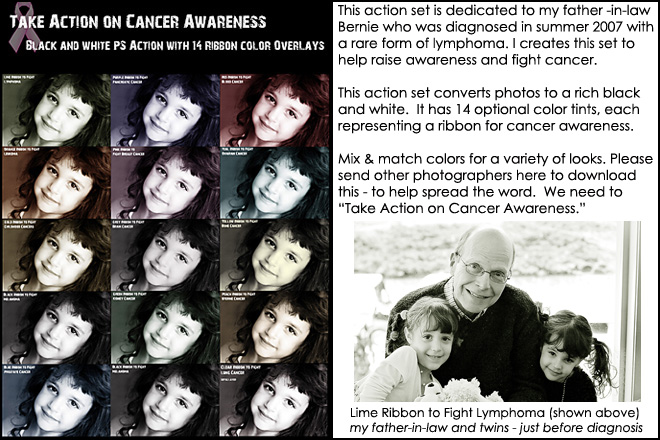
Take Action on Cancer Awareness Actions (Directions for this are part of the “installing actions” video.)
Watermark Actions (Built in directions – press play on the instructions inside the action.)
Gallery Frame Action (This action does not need directions. Just click play!)
#2 Pencil Sketch Action (Just play and follow along as directions pop up.)
Here are a few samples of the actions in use with more details – not all actions are shown with photos and descriptions below:


No Comments
Leave a Comment
You must be logged in to post a comment.




















Recent Posts









STINKER!I HAVE all those!
hahaha! Funny lady! Happy April Fool’s day to you…and what a generous sharer of your time and talent you always are!
Thank you for sharing these again!
You got me! That’s the first prank I fell for today! LOL! Have a great day!
Grazie, sono bellissimi!
your in big trouble girl!
thanks for reminding me that today is april fool’s day! and thanks for the freebies!
Thank you!
LMAO! You got me!
Thank you so much for not only these actions but for all of the help you’ve given to us. Your generosity is very much appreciated by many more than you know.
You GOT me! I was thinking… oooh oooh free MCP actions… go quick… To funny!
Too funny! I totally fell for it! I love all your actions free or not. The touch of light/touch of dark really saved me recently!!! I got sick the morning of a wedding so my assistant and his friend took over. I ended up with a ton of underexposed photos that the peekaboo action couldn’t help. Touch of light/touch of dark did the trick and saved the photos (or should I say made them acceptable)! MCP actions rock!!!
Thanks for all the great free actions. I have really enjoyed using the ones I have downloaded. Still need to try out a few of them.
Got my heart going! Happy April Fools’ day. I love all these actions.
Thanks for sharing! However, once I’ve loaded the actions, it won’t let me play them. Is there a trick?
did you see the video on installing and using actions?
I’m with so many others…you got me! How fun!!! You have so many great actions…for sale and so generously given…how could we not fall for your little prank???!!! :o) Made me smile! Thanks for always being so generous…pranks and all!!! :o)
I am so happy this wasn’t a joke… I didn’t have any of them! Thank you so much for your generosity!
Touch of light, touch of darkness is AMAZING! I can’t say enough about it; I use it all the time! You are awesome to share all of these wonderful freebies! Thanks Jodi!
Yes, I watched the video and did all that it todl me to do, and I see the actions listed in the pallette, but the “play” button is grayed out and I get the circle with the bar through it when I hover over it. I can see the copyrights and the other pieces that are with it, but that’s it. I can’t actually use the actions.
It sounds like you are on the folder – not the actual action. If you email me a screen shot I can tell you but that is what it sounds like.
You SO got me! LOL
thanks for your generosity and all the tips you share.
This is super! Thanks for putting them in a list. Now I can just scroll through and get what I don’t already have. You’re terrific!
WAY WAY WAY AWESOME! THANKS SO MUCH! You are the best April fools give. 🙂
Thanks Jodi. I have had your HD sharpening action since Christmas, and i love it. I can only assume that I will love these too. Thanks for resharing them.
Thank you so so much for these actions. Hopefully I can figure how to use them, as I’m pretty new to all this. I’ve heard amazing things about your actions and I’m sure I’ll be back for more. 🙂
Thanks I have played with your sharpening action and like it.
What a small world! Photography & photoshop are my hobbies. I have been loving your site, learning a lot, and trying to decide what Actions to purchase first. Then this morning I see the picture of your father-in-law and realize, he’s my boss (sort of)! I work in the Bay City “office,” so he wouldn’t know me, but we’ve met a few times and we are all so glad that he is doing so well after the challenges he’s been through medically. P.S., I ‘m so jealous you’re going to the final four!
Hey Jodi…You are the queen of actions and I love everyone I have ever purchased from you. I was just checking out your gallery frame actions because I need an action that will allow me to proof gallery wrapped canvases with a three d look to them. Any chance you could develope something like that? I would purchase that this instant! Keep up the great work!
Just found this link – thanks so much for sharing these!!!
Jodi…. You are a godsend for me! I am a photographer in progress, and constantly improving my work and your blog is soooo informative and educational for me. I am learning a lot about using photoshop and I love your actions. I can’t wait to use them!!