
Featured Products
-
Sale!

-
Sale!

-
Sale!

-
Sale!

-
Sale!

-
Sale!

-
Sale!

-
Sale!


Do you ever dream of clicking a button and having your watermark applied to all of your photos in a particular spot (scaled correctly no matter what)? What if this “Dream Tool” could do this for you in high or low res and could put the watermark in the center or either corner of your photo and do this on entire folders of photos at a time?
Think this tool would save you time? Well I do wish this was my creation. Sadly it is not. But I had to tell you about it. Here is a quick snapshot at what the panel looks like:
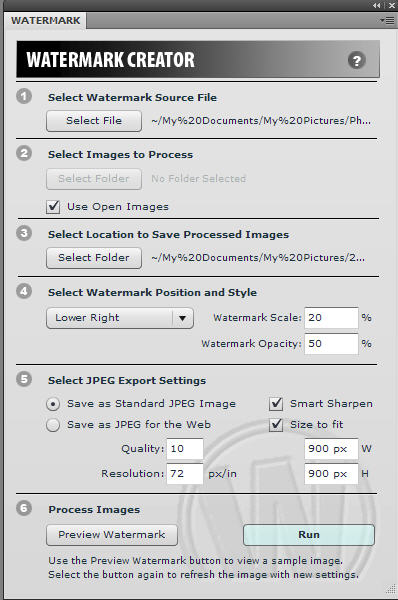
It is a “Watermark Creator” for Photoshop CS4 (it is a panel that you install and it does the work for you). How much does it cost? Where can you get it? FREE (sort of – you have to join or be a member of NAPP) – click here to join the National Association of Photoshop Professionals and you can download the “watermark creator panel” and a video on installing and using it” for FREE. You can get this Watermark Creator on the front page of NAPP site once you log in or join.
In case you have been wondering if NAPP is worth it, below is a list of other great reasons to join, besides these amazing monthly freebies.


No Comments
Leave a Comment
You must be logged in to post a comment.




















Recent Posts









I searched and cant find it and i’m a member. What category do they put it under?
email me directly if you cannot find it and I can send a link – the link will only work if you are a member. But I am not sure NAPP would want me putting the direct link out to the public regardless 🙂
sent it to you…
Sounds great! Do the offer it for CS3?
Shelia – nope – panels are new to CS4 – they do not work in past versions. NAPP is an amazing resource regardless – but I figured I would let people know of the goodie I found there too.
I have been a NAPP member for several years but cannot locate the Watermark Creator Panel download within the site. Would you kindly send me the link, for which I would be very grateful!Perfect timing, as I have been researching for new watermark method for the past several days. Currently use Watermark Factory but would love to mark images for web within Photoshop CS4. Thank you so very much!
Here is a simple easy step to create your logo brush, to stamp yourpicture. Step 1: go to file, new, make the size 2500×2500 and keep the resolution at300. Change the color mode to grayscale and have the bgrd be white.Step 2: Have your logo open in a separate tab and with your move tool dragit onto your new grayscale file. You may want to use the curves tool todarken up any areas or lighten up any areas but I have found it to be justfine moving it over as is.Step 3: Go to edit, define brush preset(you may have to click on show allmenu items), name it whatever you want and click okay. Then go to yourbrushes and there you have it. Open up a picture and find your new logo brush and apply it to yourpicture. You can change the color to anything and also play with theopacity to give it a softer look if you’d like and you can change the sizeof it as well!
Thanks for sharing Melissa. My FREE watermark action set (under try me) on my website can help you accomplish a similar stampable watermark. It is easy to follow with Melissa’s steps too.The difference is that the watermark creator panel literally automates the process – so you can have a watermark land at the exact spot you want and size you want on hundreds or thousands of photos with a few clicks – go get coffee – come back and done :)But for smaller jobs, a stampable brush is awesome!
Hi Jodi,I can find the watermark creator on NAPP. Can you send me the link,Thanks!
I can’t find it either. Any way I can get the “cheat link”. BTW, I am a member — just renewed. You were the catalyst. Thanks again.
Can’t find it even with a search, can you please send me the link?Thanks a lot
sent it to you.
Wow works like a charm!! Now just to figure out what kind of post processing the guy had on his photos from the video?? That looks fantastic!! Love that look and would love to put in some of my senior photos!! Any ideas?? Looks like topaz adjust to me but unsure??
To find the watermark google free watermark NAPP comes right up first choice
Great article. Please send me the link to this program. Thanks!
I’ve searched NAPP exhaustively and cannot find it. Please send the link. I’m a member and have been for years. Thanks!
Just signed up for NAPP could you please send me that watermark link? Thanks.
I’m a member. Don’t know where the link is. It would be appreciated 😉
Hi! Could you please send me the link to the watermark creator. I have been searching, but can’t seem to find it. Thanks!
Can you please send me the link for the watermark creator? I joined about 2 months ago.