
Featured Products
-
Sale!

-
Sale!

-
Sale!

-
Sale!

-
Sale!

-
Sale!

-
Sale!

-
Sale!


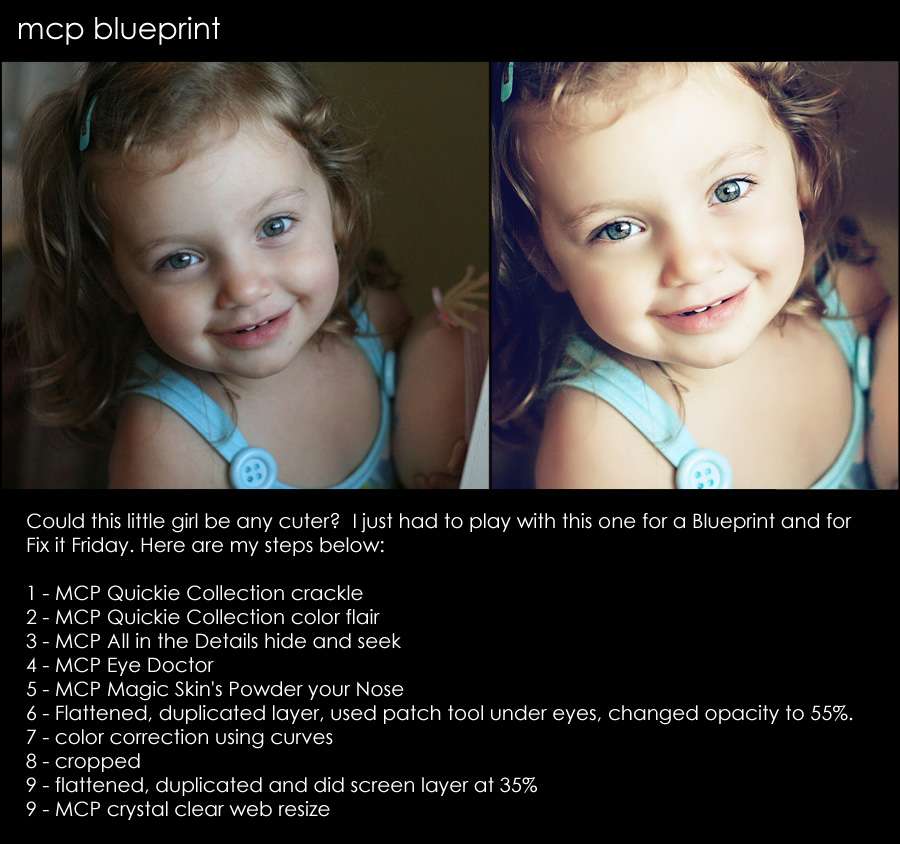
This week’s photo comes from Fix It Friday at I Heart Faces. I participate as a contributor there every few weeks. This little girl is just adorable – so I was excited to improve upon her photo. Here is my play and step by step of what I did.

Posted in Blueprints, Photoshop Actions

No Comments
Leave a Comment
You must be logged in to post a comment.




















Recent Posts









Great job Jodi!! I love how her eyes pop and her skin has a slight glow!
love it!
Perfect PP choices. Looks amazing!
I am starting to LOVE actions…amazing when you understand them better how much fun something can be…lol. thanks for sharing. I feel like PS is a never ending learning process
GORGEOUS play, Jodi!!! I LOVE your actions and use at least 1 of them on every single photo!!! Thanks so much for doing these blueprints!!! It really helps me to understand the use of the actions even better.
AMAZING! I love it! Nice job! I LOVE your actions!!!!!!!!!!!
Great job Jodi! I love how you put the blueprints up because it really opens my eyes as to when to use them, thank you! 🙂
Great job!! Love how you enhanced this photo!
Awww she’s amazing! the edits are perfect and I really love the coloring!
adorable! and thanks for the rundown.
I really need to try to duplicate this – I just can’t seem to use the eye doctor well. You really did such a beautiful job!
Darlean – let me know what you cannot duplicate with the eye doc so I can help you.
Wow – that is amazing and she is a total cutie! I am going to have to break down and buy the actions once I can afford them!
Beautiful!
This is gorgeous! I’m loving the eye doctor action from you. Amazing work! :):)
Her right side is blown.
Vikas – I am not seeing that in PS at all. I just opened it up and checked again. There is no channel at 255 (or even above 247 anywhere I can find on the face). There are a few spots in the highlights where the red channel is at 247 – so in those areas it is brighter. But none that I can find qualify as blown.
What a terrific re-do. She is adorable and you rocked it!
Wow You are FABULOUS!!
This picture is of my daughter, and I love your edit Jodi! Love the crop, love the edit, and LOVE your actions! I follow your blog every day, and it’s just so trippy to see my picture on it. lol. Thanks so much 🙂
How rad! I am so tapped out from buying my camera and lenses, but I want your actions sooo bad!! This pic looks like a lilyblue action, which I love, too.
Hey Jodi, what is the step 9 for ? (flattened, duplicated and screen layer at 35%)Looks great!
screen layers – that is a blending mode and it brightens up the photo.
Jodi .. amazingly beautiful (as always!) .. the tones in your edit are divine. How did you achieve these in curves?