
Featured Products
-
Sale!

-
Sale!

-
Sale!

-
Sale!

-
Sale!

-
Sale!

-
Sale!

-
Sale!


Daniel Hurtubise is doing a series on his upcoming trip to the Alaskan Wild. Hopefully this will help you learn what you need to prepare for a huge expedition. Last week he will be discussed his camera gear. This week he will cover what other equipment he will be bringing.
Since I’ve covered the hardcore gear, here’s the rest of the equipment that I will be bringing… so far.
A tripod and a monopod are very important equipment to any nature photographer. You need the tripod if you want to shoot panoramas ( will cover that in another post) and you need a monopod to hold longer lens (300mm and above can definitely use a monopod). I’ve always bought Manfrotto gear so here’s that I’m bringing.
Tripod
Manfrotto 190 MF4
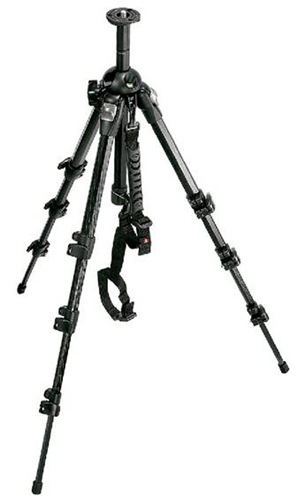
I’ve had that tripod for a few years now and it always served me very well. The only thing I could complain about is that for a 6’ guy it doesn’t get very high. But on the other hand it’s a small price to pay for portability. Once folded (It’s a 4 section) it measures less than 18”
Monopod
Manfrotto 694

As you can see I’m using Carbon Fiber because it has huge benefits on that kind of trip. Obviously it doesn’t get any lighter, but it also doesn’t freeze. And the reason why I’m using that series, and not the one with the rotating lock(to extend the leg you simply need to rotate the leg and it unscrews) is that while I’m on location if a lock breaks I can fix it myself. All I need is a lock and the Allen key needed to replace it…which I obviously carry in my bag.
Heads
On this trip I will mostly carry 2, my panoramic head and the standard 3 axis one. I also use a Manfrotto 322RC2 Heavy Duty Grip Ball Head but not on that kind of trip.
Standard 3 axis
Manfrotto 460MG
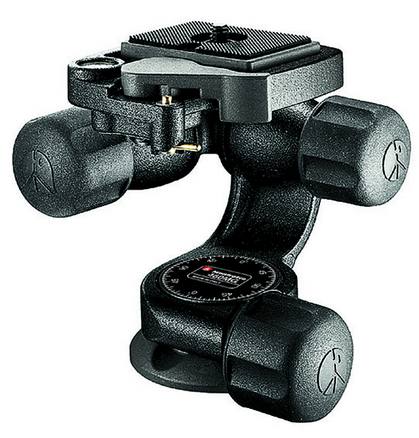
Same criteria applied here, lightweight. This head is made of magnesium and as you can notice doesn’t have the regular “handle bar” but some neat little knobs. Makes it even smaller to carry around and it’s easier to manipulate then it seems. There’s also an embedded level which is critical for landscape. Nothing worst then taking a shot hand having to rotate 4 degrees and loose pixels.
Panoramic head
Manfrotto QTVR 303
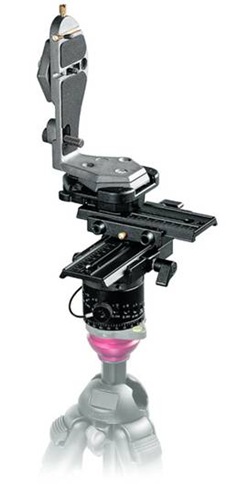
This one is a heavy hitter. All made of iron it’s heavy believe me. But I figured that for a place like Alaska I NEED to bring that. The image above is also missing a piece. But basically that kind of head allows you to place your camera and lens precisely on their nodal point (the exact point where the light is refracted into the mirror). This allows you to rotate around and still keep the image seamless.
You can see a low resolution sample here. This shot was made of 7 images taken at ISO 100, f/11, 1/100, 24mm. The final Photoshop image is 325MB.
Filters
Those ARE your friends. Buy them and learn to use them. I use types of filters: Polarizing and ND
Circular Polarizer
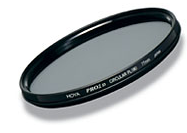
That kind of filter allows you remove reflections from water or even snow. That’s a must for any landscape photographer. You will also get more vivid color without post-treatment. Of course you can always use Jodi’s actions J
ND

This is another must have if you do landscape. Remember all those shots where the sky is blown out? That’s exactly what it’s for. Half of the filter is covered with a Neutral Density that you will align with your sky. Allowing you to change the stop difference between the landscape and the sky thus giving you way better pictures.
Unfortunately most photographer neglect that kind of tools and rely too much on post-processing. You’re post-processing will be a lot better if you start with a good shot.

No Comments
Leave a Comment
You must be logged in to post a comment.




















Recent Posts









Kansas A Says: Thanks Daniel for answering my questions. Solar power! I didn’t even think of that, what a great idea. On my Canon T1i I have “format” on my menu for quick access because I think formatting the cards in the camera is much better than doing it on the computer. I look forward to your next post Totally agree with you, I always format the memory card once I insert it in the camera. On the D300 you can quickly format a card by pressing and holding the Mode button and the Delete button. “For” will appear on the LCD. Press Mode and Delete again and your card if formatted.Penny Says: Thank you. Fantastic post. I’m a D300 user. Don’t know if you plan to cover this, but would love to hear about your decisions on exposure while taking photos on the trip (how you get it in camera), and your method to get perfect focus. Jodi, thanks for having Daniel”_wonderful.Thanks for the idea; I can sure cover that in a post. I could also mention HDR at the same time.Summer Adams Says:Great info. I can’t wait to see the pics and hear about the experience.Thanks a lot; I can’t wait to share either¥_
I would love to hear more about the photography in Alaska. I have a D300 and am enjoying using it. I have certainly brought my photography skill up quite a bit since I got the camera and I feel that it is the camera that helped to improve.