Blueprint – Baby Time – Making a Cute Newborn Even Cuter
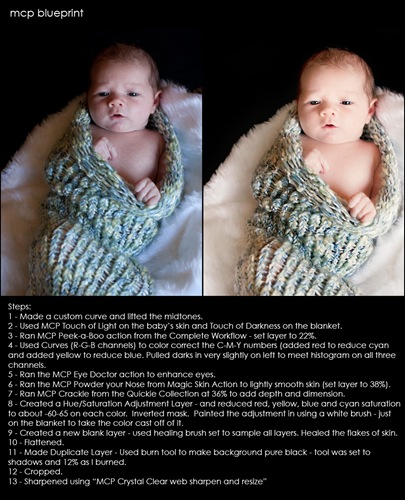
This photo was sent in by Nilofar Walters of Fig Tree Photography in Australia. She wrote me an email that read, “First off thank you for a wonderful and informative blog. I have also bought a couple of your actions and I love them! I have a question. How do some newborn and baby photographers create that beautiful, light and creamy look to their photos?”
She is relatively new to newborn photography and with time her straight out of cameras will get better and better too. But here is what can be achieved in Photoshop. Step by step of this blueprint before and after is shown below the photos.
Tags: blueprint, Blueprints, creamy newborn skin, MCP, newborn photography, photographer, photography tips, photoshop, Photoshop Actions, Photoshop Tips & Tutorials, retouching16 Comments
Welcome to the MCP Actions Photoshop Blog
- Learn to enhance your images with time saving Photoshop tutorials. Join us for daily blog posts with the latest photography and photoshop tips, contests, photographer interviews, and blueprints teaching how to use photoshop actions.
Featured Posts
- Editing Landscape Images Using Actions in Photoshop
- My Camera Takes Really Nice Pictures
- Over-Editing in Photoshop: How to Avoid 25 Common Editing Mistakes
- Portrait Photography Trends & Fads: The Good, The Bad, The Ugly
- Finish It Photoshop Actions Set Now Available ~ Changing the Way You Prepare and Display Images on the Web
- See All Featured Posts
Recent Posts

- Win Holiday Card Templates from Photographer Cafe
- Photoshop Alone Does Not Make a Good Photographer
- Watch Me Work: Photoshop Actions & Workflow Online Class
- Tips for After Your First Portrait Portfolio Building Session: Part 2
- 7 Tips for Your First Portrait Portfolio Building Session: Part 1
- See All Recent Posts

Polls
Photoshop Tips
- Outdoor Image Fixed in Photoshop: Better Sky ~ Better Lighting
- Senior Photography: Tips and Tricks on Posing, Locations and More
- Using Photoshop Actions to Enhance a Blue Sky and a Rainbow
- Photoshop Actions: Glossary of Offerings by MCP Actions
- Photoshop Actions: A Guide to Choosing the Best Actions
- See All Photoshop Tips
Video Tutorials
- Photoshop Video Tutorial: Watch Me Work {Color Pop, Eyes, Skin}
- The Secret to Using Photoshop on an iPad and iPhone
- Installing Photoshop Actions in Elements: Video Tutorials
- What Are Photoshop Actions And How They Can Help Or Hurt Photography
- Free Photoshop Action + Video: To Add Texture to Photos in Photoshop
- See All Video Tutorials Posts

Categories
- Activities
- Announcements
- Assignments
- Blueprints
- Business Tips
- Cancer Awareness
- Contests
- Discounts, Deals & Coupons
- FAQs
- Featured Post
- Free Actions
- Free Photoshop Stuff
- Guest Bloggers
- Interviews
- MCP Collaboration
- MCP Thoughts
- Photo Sharing & Inspiration
- Photography & Photoshop News
- Photography Tips
- Photoshop Actions
- Photoshop Tips & Tutorials
- Polls
- Social Networking
- Video Tutorials
- Workshops


9:10 amJuly 10th, 2009
This is a great tip. My brother just had a little one, so i will use this trick to anhance the photo’s i take…. Thanks
10:15 amJuly 10th, 2009
Beautiful Jodi!
10:20 amJuly 10th, 2009
Great tut, Jodi.
10:46 amJuly 10th, 2009
This is really remarkable. I just love your blueprints and tutorials!
10:47 amJuly 10th, 2009
Amazing, thanks for the tut.
11:22 amJuly 10th, 2009
I don’t understand step 4. Could you please explain. I saw you do something like this on one of your workflow videos using the eye dropper tool (I think?) and I just can’t comprehend it. Or could you point me in the right direction?
4:40 pmJuly 10th, 2009
Beautiful – thanks for sharing (:
10:48 pmJuly 10th, 2009
Thanks Jodi! You’ve helped me heaps!
2:40 amJuly 11th, 2009
What a transformation this is! I can’t believe it’s from the same original image. Your tutorials/recipes are fantastic, thank you!
12:43 amJuly 12th, 2009
Jodi,
You have a magic touch. That is a beautiful transformation. Would you mind explaining what you mean by a “custom curve”? Is it a manual curve adjustment? Thanks!
4:50 amJuly 12th, 2009
Amazing result – very beautiful
9:08 amJuly 12th, 2009
custom curve just meant curve I made not in an action. So in this case I lightened midtones using curves.
1:51 pmJuly 12th, 2009
Beautiful transformation!
5:58 amJuly 13th, 2009
[...] Blueprint – Baby Time – Making a Cute Newborn Even Cuter | MCP … [...]
7:08 amAugust 18th, 2009
Cute newborn,beautiful mcp blue print.Thank fot sharing.
8:19 pmSeptember 1st, 2009
Love how this photo turned out. And with the clarity of the after pic. …Its just beautiful.