
Featured Products
-
Sale!

-
Sale!

-
Sale!

-
Sale!

-
Sale!

-
Sale!

-
Sale!

-
Sale!


Thank you to Stephanie Gill of TinyTot Snapshot Photography for this fantastic tutorial on using brushes to add clouds to a photo in Photoshop.
Hello again, I will be doing tutorials for the 5 brush techniques I mentioned prior in the upcoming weeks ahead.
Today’s tutorial focuses on adding clouds to a photo. Whether your photo needs that something extra, or you had trouble exposing the sky and ground, using a cloud brush is a fast and simple way to made more interest to your photo.
Adding clouds is probably the easiest thing you can do and with the least amount of steps. I use the same method for every photo. Don’t over think it, there are plenty of days you walk outside and the sky looks like a painting, almost too perfect.

For this picture I started off by adding a soft blue sky to the photo. Since Jodi already has a great previous post about how to add a sky to your photos, I am not going to go into great detail for this part. Once I added the new layer of sky I needed to mask off some areas where the blue went onto the tops of the trees. For this I used the leaf brush that comes with Photoshop.
I chose this brush since the trees are not a straight line across the photo I needed a brush that would make the horizon line look realistic.
I used cloud brushes from deviant art and started off by adding clouds to the edges/corners of the photo and then add in others to the middle.
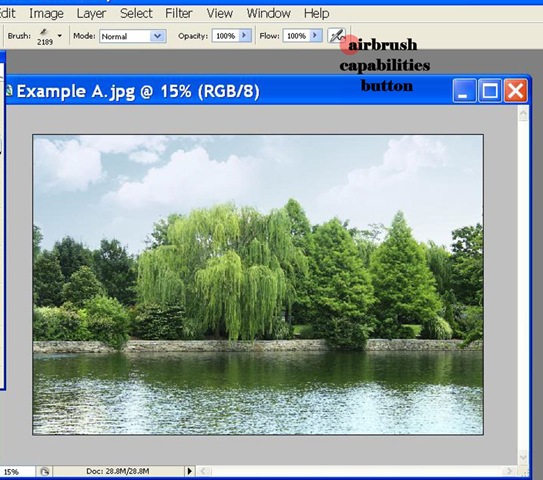
Trial and error is key, not every cloud is going to look right, if you add one you don’t like just go to “Edit” and then “Step Backward.” For this photo I only used 3 brushes. Each had 100% opacity but they still were not dark enough so I clicked the airbrush capabilities button and the size of each ranged from 1722 px to 2500 px.
The ending result is subtle and adds the perfect finishes touch to a simple photo.

No Comments
Leave a Comment
You must be logged in to post a comment.




















Recent Posts









Jodi, Just want to say thanks for your wonderful blog. Love it, Love it, Love it! I am constantly amazed by all of these wonderful things you enlighten us with, for free! THANKS!!!
Wow, how awesome thanks for the help!
Thank you Amy, that was wonderful and easy to understand…I was just working on an image yesterday that needed clouds…thank you, again for being there, Jodi… “photoshop Goddess” 🙂
Good tutorial, thanks.I’ve found a huge collection of photoshop brushes hereI hope this help you.Mark