
Featured Products
-
Sale!

-
Sale!

-
Sale!

-
Sale!

-
Sale!

-
Sale!

-
Sale!

-
Sale!


I usually get 3-5 emails a week asking how people can avoid and/or remove glare on glasses. There are a number of ways to avoid, reduce or eliminate glare.
- Watch the light and how it affects the glasses while taking the shot. Turn your subject in different directions until the glare disappears.
- Reposition the subject – turn at various angles until you do not see the light in the glasses.
- Tilt the glasses. By slightly angling the actual glasses up or down, you can decrease or often eliminate glare altogether.
- Burn baby burn – sometimes if you have light glass glare, you can just use the burn tool and deepen the glare to blend in.
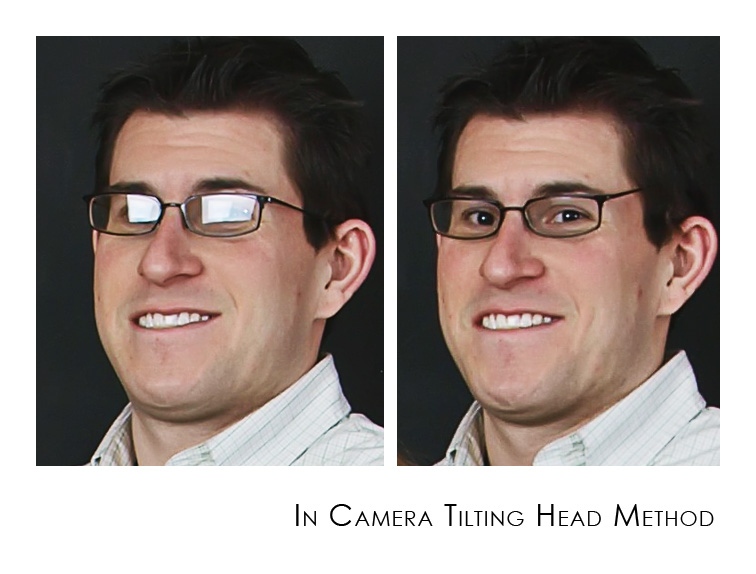
- Take 2. Take shots of the subject with and without his or her glasses on. Then use photoshop to merge the two images – taking the eyes of the non glasses wearing image and putting them into the glared glasses.
In the photograph below the subject was positioned the same way in both shots, but the glasses were tilted slightly downward which eliminated glare (illustrating tip 3). Thank you to Crane Photography for providing these images. Come back tomorrow for a tutorial on tip 5 – and learn to merge two images to eliminate glare.
Posted in Photography Tips, Photoshop Tips

No Comments
Leave a Comment
You must be logged in to post a comment.




















Recent Posts









AMAZING! I was just going to ask about this! Thank you for this great post.
Interesting suggestion re: tilting the glasses. However, it seems to have increased the lens distortion around his eyes and (maybe just because you pointed it out) the tilted ear pieces look a little ‘funny’ to me.I’m looking forward to your tutorial!
Thank you! I’m photographing a friend’s daughter tomorrow, and it will be the first time I’ve photographed a client who wears glasses. I’ve been reading up on all that I can to minimize the glare *before* the shot is taken, and this is really helpful.
Jodi, I also carry a small glasses repair kit with me…if timing is not an issue, I have the client remove the lenses for some of the images or bring a second pair with the lenses already removed. It looks completely natural and and no tilting of the frames is needed. Unfortunately that’s not always possible, which is where your tutorial come in handy! Thanks for the tips!
Marci – I knew I was forgetting a tip – it was at the “tip” of my tongue too. May I add this to the list?
Tilting the glasses looks weird. His glasses aren’t resting on his ears. Remember lighting is like playing pool. Angle of incidence equals angle of reflection.
I prefer the method I will show you tomorrow – which is swapping – but it is more time consuming. Also on the above shot – you could clone and move the straight part of the glasses so it was lower and would look more natural. This was SOOC – without editing.
Short lighting doesn’t work well with people with glasses. Broad Lighting the subject is the safer bet.
Most of my clients that wear glasses happen to work in the media so they have non-glare glasses so this is not an issue, but occasionally I have had kids or adults with non-glare glasses – if you are careful with the way you angle their face (sometimes having them look up toward you instead of in this case he is looking down his nose, will help) – but then you have to be aware that when asking them to tilt their head down that they aren’t getting extra chins 😉 Sometimes having the softbox higher than usual can help as well. I don’t like to do the glasses tilt as shown above – I think it looks really unnatural. Very very few clients can pull that off, and it has to be certain angles with the camera – in the case above, the glasses obviously look “off”.
circular polarizer!
Hey I know that girl. Hey Cara, your work is looking fantastic. Good info here on something that comes up all the time.David
All this is very helpful but what happens if you are doing a reunion picture with 4 different families involved and they all wear glasses…at least all the adults? 8 out of 12 of them for sure.