
Featured Products
-
Sale!

-
Sale!

-
Sale!

-
Sale!

-
Sale!

-
Sale!

-
Sale!

-
Sale!


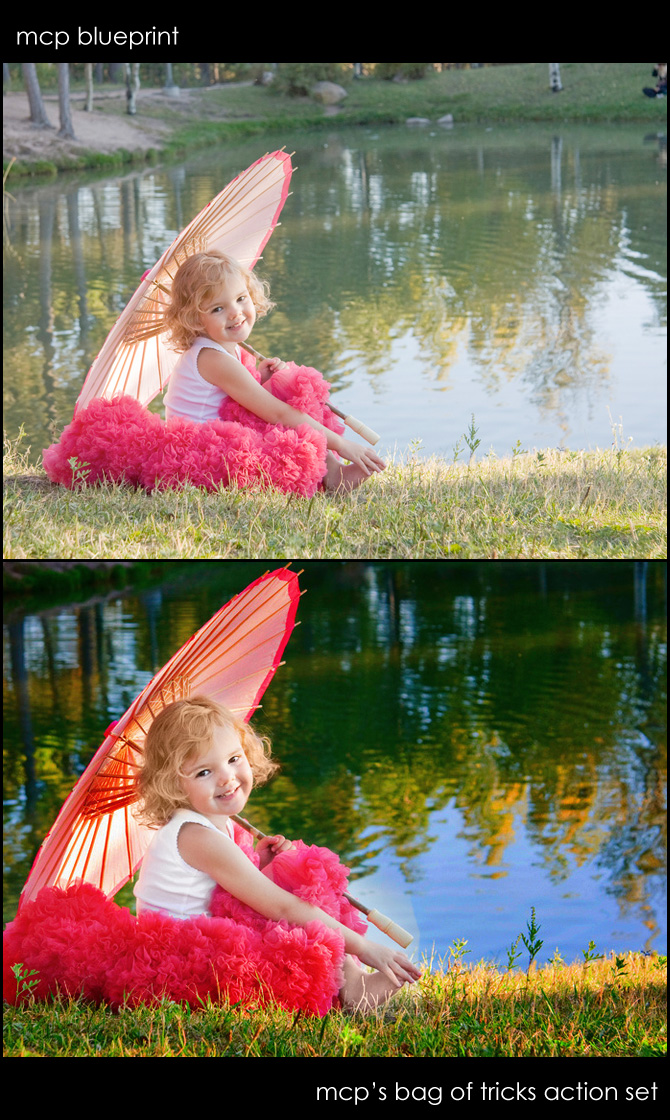
This adorable photo is from Kara Roberts Photography. She wrote, “I have tried and tried to post process this one but they all turn out ICK. She’s just surrounded by green, and even when I do a levels and curves adjustment it just makes the green worse.”
So I decided to play with Kara’s photo and here is what I came up with (shown as a before and then after). All editing was done using the MCP Bag of Tricks photoshop action set.
Ran Magical Contrast (left on default)
Ran Magical Clarity – lowered to 18%
Ran Magical Color Finder Brush and painted on background using 100% brush – and on her skirt and umbrella with 30% brush. Increased the opacity of the layer to 85%.
Ran Bleach Pen – and used it on her tank top to get rid of color cast on the white.
Ran Magic Light and painted on her foot with 50% opacity brush so it would blend with the rest of her skin. And used a 30% opacity brush on the rest of her skin to brighten.
Ran Magic Dark and painted the entire background darker using a 30% brush (which made it much richer) Changed layer opacity to 88%.
Cropped
*** As always I would love to hear your feedback, comments and thoughts on the edit. What do you like about the edit – and what do you not like? What would you do differently if it were your photo?

No Comments
Leave a Comment
You must be logged in to post a comment.




















Recent Posts









That last blueprint is amazing!! Wonderful Work 😉
WOW beautiful images and amazing work!!!!
Wow, I’m sold!! Love this place. Thanks Jodi
Thanks for sharing these fun pictures…beautiful work and a great way to see the “Bag of Tricks” in action. The orbs of light in the last one are special…they look like fairies in the field…cool!xo
OMG! These are awesome! Now, I just need someone to shoot me! Thanks for sharing!
Beautiful work. Love, Love, Love the field shots!
Beautiful, that must have been so fun!!
Beautiful work, love your story. Camilla, would you share with us about the location…when you discovered it, how did you approach the owners? Were they open to having you shoot there, no problems? Thanks!
Wow these are awesome!
Absolutely stunning!!
I was looking at these and when I got to the bottom I had a thought “this sure does look like you” so I scrolled to the top and read, which is what I should do first, heehe! Its your sister, wow you two look alike! Had to share with you???lol
Great lesson ~ Great shots! The last one is my favorite, I’m a big fan of fields and weeds:)
Hi Debbie! I just asked the girls at the front desk the day I first saw the greenhouses. I figured since they were not being used and we would be coming during regular business hours that we wouldn’t be bothering anyone. They were so nice and totally agreed. Easy as pie! But I know if it were a larger and more popular pumpkin patch that they would have been a little more stingy. A lot of times if I just promise to blog about their business then they’re game!
Camilla,Thank you so much for the response. I do appreciate it. Just curious. I’m in Oregon. I’ve been getting my nerve up to just go up and ask also. I was wondering if you offered them some kind of prints, but blogging about their business is a great alternative. Thanks, again.
These are absolutely gorgeous works of art, Camilla! Love your vision and the story. You have definetly shown your sister’s inner and outer beauty through your talent. Thank you for sharing and giving us the bluprint recipe from Jodi’s actions.
Seriously these pictures rock and that outfit is to die for!!
I need a new website because my current one says it all! Just visit it and you will see for yourself!!!!!!!! I’m really in desperate need of something professional!!!1Debbie Perrin
I love her look….very edgy looking. The pics are very editorial…..I’m thinking “Vanity Fair” or something.
Wow! Those images are beautiful! The editing is outstanding.
Love these blueprints!!! Great job.
I love the tones in the last photo!