
Blueprint – Subtle Edits for a BIG Impact

facebook Blueprint   Subtle Edits for a BIG Impact twitter Blueprint   Subtle Edits for a BIG Impact pinterest Blueprint   Subtle Edits for a BIG Impact plusone Blueprint   Subtle Edits for a BIG Impact

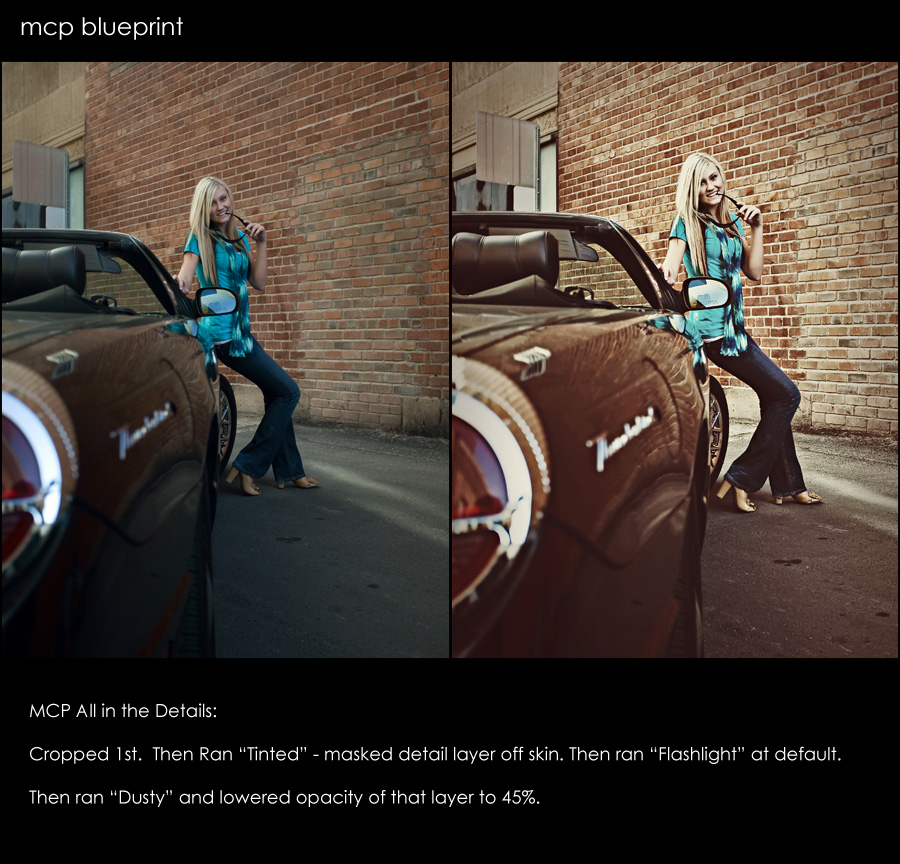
Some photos take a lot of editing, while others just need a few quick clicks of the mouse.  Here is an edit that was done in about 30 seconds or less.

  • Started by cropping.
  • Then used “All in the Details” Tinted action.  Masked detail layer completely off skin.
  • Then used “All in the Details” Flashlight Photoshop action at the default opacity.
  • Then used “All in the Details” Dusty vignette action – changed the opacity to 45%.

That was what got me from the before to after – I love how it brought out details in the bricks and pulled out shine on the car.  Looking at it now, I might have preferred it more if I lighted the socket area around her eyes.  What thoughts or feedback do you have.  Next time you look at an image you edit, try and critique it as I did above – see if there is something you would change or do differently with past edits too.
blueprint4 Blueprint   Subtle Edits for a BIG Impact
pin it4 Blueprint   Subtle Edits for a BIG Impact

 Blueprint   Subtle Edits for a BIG Impact

Jodi Friedman, MCP Actions

Jodi Friedman is the founder of MCP Actions. She designs popular Photoshop actions and teaches Photoshop to photographers across the globe.

More Posts - Website - Twitter - Facebook - Pinterest - Google Plus

Previous Post:
Next Post:

9 Comments and 0 Replies


  1. 1

    Aren't you on vacation?!?! :-)

  2. 2

    LOL! @ Donnell. Very nice edit!

  3. 3

    [...] 1 votes vote Blueprint – Subtle Edits for a BIG Impact Some photos take a lot of editing, while others just need a few quick clicks of the mouse.  [...]

  4. 4
  5. 5
    Kate Lindsay says:

    wow this really did bring out the bricks, well done

  6. 6

    yes – I use WP and schedule ahead :)

  7. 7
    Jeannine says:

    Love what you did to the bricks and the car, but I would have chosen the first picture, because I prefer my model to be crisper and sharper.

  8. 8
    Robby Regan says:

    I love it. I wish I could figure out how to unzip an action…or whatever it is that you need to do to make them work on PSE 8. I am off to read more xxxRobby

  9. 9
    Pam L. says:

    Now this is a blueprint that I can love! Easy, quick, dramatic results!
    Thanks for sharing this one with us.


Leave a Comment

Image Map





































