
MCP Blueprint: A Cowboy Before and After
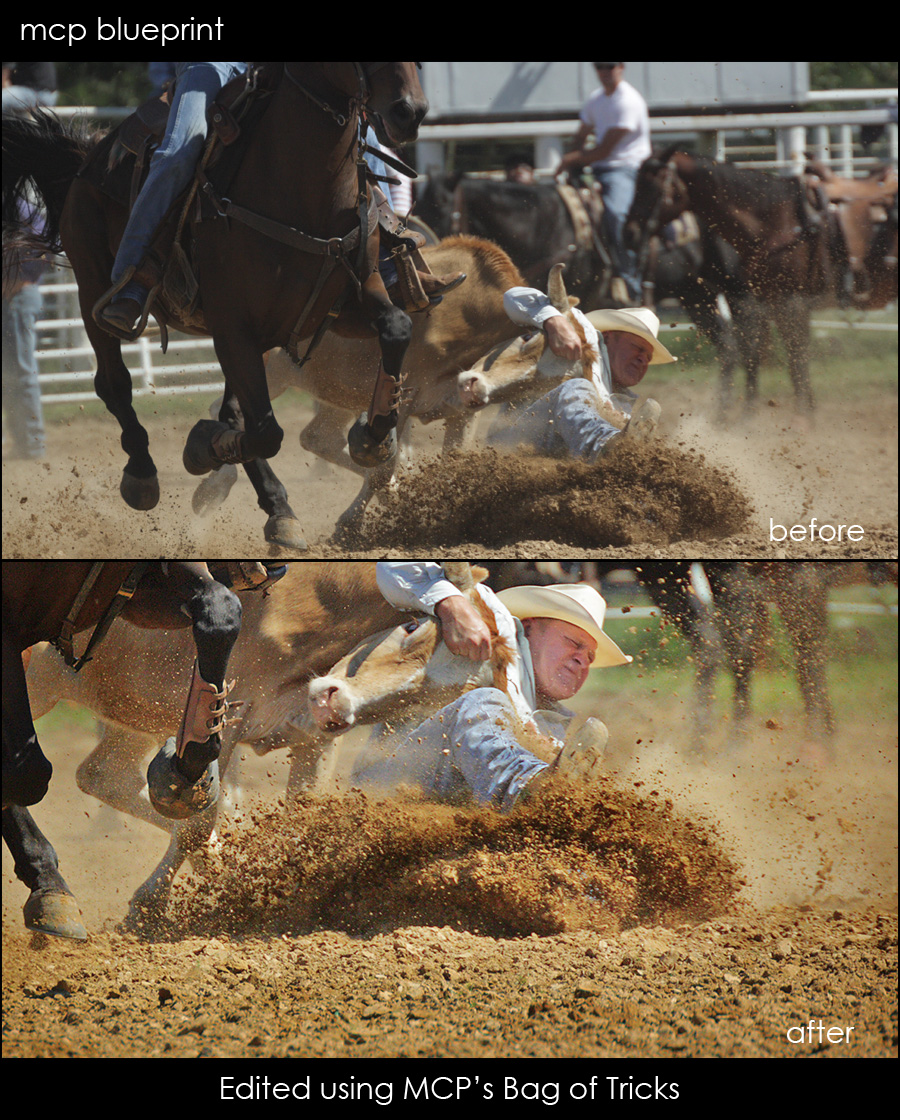
Here is another edit I did for my role as a contributor at I Heart Faces. This photo was submitted by Jenna Thomas. She felt the photo was a little bright and needed to be toned down a bit and she wished the colors were more vibrant. She also felt like it might be overexposed.
The exposure was sort of flat on both ends so I ran MCP Actions Bag of Tricks’ Magic Recovery at 100% and then Magic Fill Light at 50%.
From there I ran MCP Actions Bag of Tricks’ Color Finder Brush to pull out some of the color in the dirt.
Then I used MCP Actions Bag of Tricks’ Magic Clarity to help give more dimension to the photo.
Then I used MCP Actions Bag of Tricks’ Magic Light to bright the face and selected areas of dirt. And Magic Dark to again deepen selected areas of dirt.
I cropped closer in and resized and sharpened for web using MCP’s Crystal Clear Web Sharpen and Resize.
If you want to play with this photo, you can do so by going to the I Heart Faces site and downloading it there.
4 Comments
Welcome to the MCP Actions Photoshop Blog
- Learn to enhance your images with time saving Photoshop tutorials. Join us for daily blog posts with the latest photography and photoshop tips, contests, photographer interviews, and blueprints teaching how to use photoshop actions.
Featured Posts
- Editing Landscape Images Using Actions in Photoshop
- My Camera Takes Really Nice Pictures
- Over-Editing in Photoshop: How to Avoid 25 Common Editing Mistakes
- Portrait Photography Trends & Fads: The Good, The Bad, The Ugly
- Finish It Photoshop Actions Set Now Available ~ Changing the Way You Prepare and Display Images on the Web
- See All Featured Posts
Recent Posts

- Win Holiday Card Templates from Photographer Cafe
- Photoshop Alone Does Not Make a Good Photographer
- Watch Me Work: Photoshop Actions & Workflow Online Class
- Tips for After Your First Portrait Portfolio Building Session: Part 2
- 7 Tips for Your First Portrait Portfolio Building Session: Part 1
- See All Recent Posts

Polls
Photoshop Tips
- Outdoor Image Fixed in Photoshop: Better Sky ~ Better Lighting
- Senior Photography: Tips and Tricks on Posing, Locations and More
- Using Photoshop Actions to Enhance a Blue Sky and a Rainbow
- Photoshop Actions: Glossary of Offerings by MCP Actions
- Photoshop Actions: A Guide to Choosing the Best Actions
- See All Photoshop Tips
Video Tutorials
- Photoshop Video Tutorial: Watch Me Work {Color Pop, Eyes, Skin}
- The Secret to Using Photoshop on an iPad and iPhone
- Installing Photoshop Actions in Elements: Video Tutorials
- What Are Photoshop Actions And How They Can Help Or Hurt Photography
- Free Photoshop Action + Video: To Add Texture to Photos in Photoshop
- See All Video Tutorials Posts

Categories
- Activities
- Announcements
- Assignments
- Blueprints
- Business Tips
- Cancer Awareness
- Contests
- Discounts, Deals & Coupons
- FAQs
- Featured Post
- Free Actions
- Free Photoshop Stuff
- Guest Bloggers
- Interviews
- MCP Collaboration
- MCP Thoughts
- Photo Sharing & Inspiration
- Photography & Photoshop News
- Photography Tips
- Photoshop Actions
- Photoshop Tips & Tutorials
- Polls
- Social Networking
- Video Tutorials
- Workshops


8:22 amDecember 11th, 2009
[...] 1 votes vote MCP Blueprint: A Cowboy Before and After Here is another edit I did for my role as a contributor at I Heart Faces. This photo was [...]
9:29 amDecember 11th, 2009
very cool!! Gotta love a steer wrestler
10:46 amDecember 11th, 2009
What an amazing transformation…bag of tricks is definitely on my wish list for Christmas! And the crop you did totally changed the focus of the photo…great job!!!
11:12 amDecember 11th, 2009
In total awe. This inspires me so much! Is it possible with future before / after photo edits to also list the Camera, Exposure, Aperture, Focal Info and ISO information? Awesome. Pure awesome photo.




































