
Blueprint: Add Drama to Your Edits
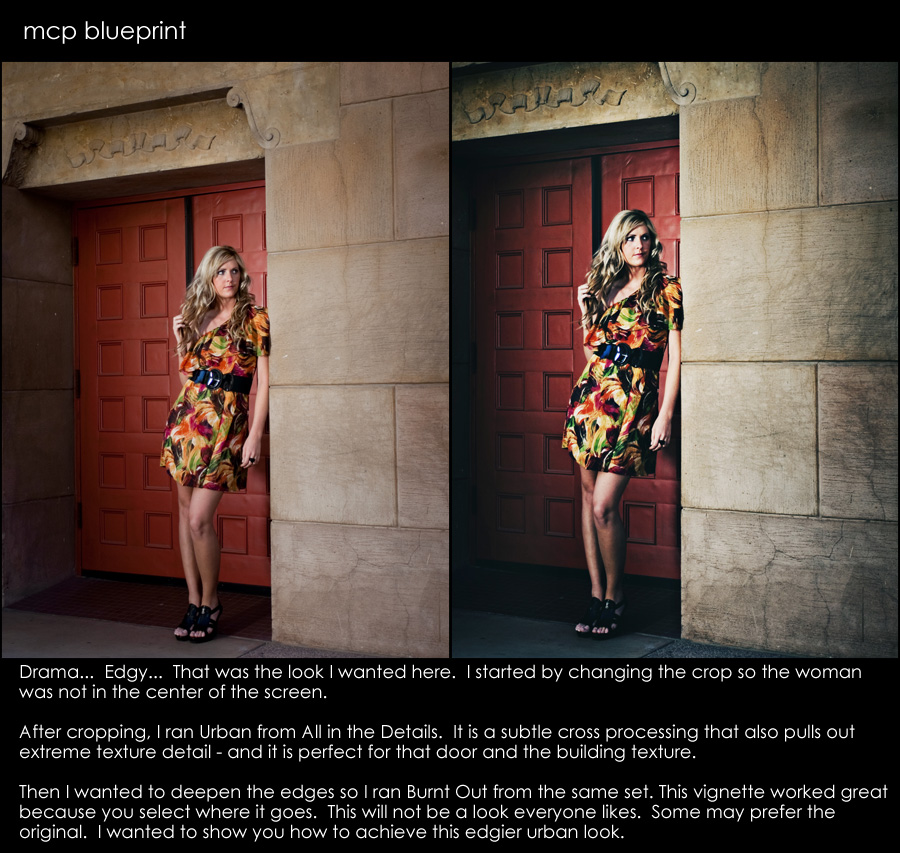
Sometimes I like to have a bit of drama in my edits. I would say that I add drama by bringing out details and adding contrast simultaneously. For this Blueprint, I wanted to create a really moody effect.
- Cropped 1st – yes – often you will hear that you should crop last. But rules are meant to be broken and since I did not like the composition, and since I knew what aspect ratio I desired, I cropped first. I wanted to take her out of the center and add space where her eyes looked.
- Then I started using actions. I turned to the “All in the Details” photoshop action set for this edit. I started by playing the “Urban” action.
- Next I ran “Burnt Out” from this same action set. It adds a custom vignette.
Believe it or not, that is all I did. Yes – the 1st image looks more natural. I could easily have edited this 5-10 different ways for different messages. Remember as you work in Photoshop that you create art and a message with every image. Make it say what you desire.
9 Comments
Welcome to the MCP Actions Photoshop Blog
- Learn to enhance your images with time saving Photoshop tutorials. Join us for daily blog posts with the latest photography and photoshop tips, contests, photographer interviews, and blueprints teaching how to use photoshop actions.
Featured Posts
- Editing Landscape Images Using Actions in Photoshop
- My Camera Takes Really Nice Pictures
- Over-Editing in Photoshop: How to Avoid 25 Common Editing Mistakes
- Portrait Photography Trends & Fads: The Good, The Bad, The Ugly
- Finish It Photoshop Actions Set Now Available ~ Changing the Way You Prepare and Display Images on the Web
- See All Featured Posts
Recent Posts

- Win Holiday Card Templates from Photographer Cafe
- Photoshop Alone Does Not Make a Good Photographer
- Watch Me Work: Photoshop Actions & Workflow Online Class
- Tips for After Your First Portrait Portfolio Building Session: Part 2
- 7 Tips for Your First Portrait Portfolio Building Session: Part 1
- See All Recent Posts

Polls
Photoshop Tips
- Outdoor Image Fixed in Photoshop: Better Sky ~ Better Lighting
- Senior Photography: Tips and Tricks on Posing, Locations and More
- Using Photoshop Actions to Enhance a Blue Sky and a Rainbow
- Photoshop Actions: Glossary of Offerings by MCP Actions
- Photoshop Actions: A Guide to Choosing the Best Actions
- See All Photoshop Tips
Video Tutorials
- Photoshop Video Tutorial: Watch Me Work {Color Pop, Eyes, Skin}
- The Secret to Using Photoshop on an iPad and iPhone
- Installing Photoshop Actions in Elements: Video Tutorials
- What Are Photoshop Actions And How They Can Help Or Hurt Photography
- Free Photoshop Action + Video: To Add Texture to Photos in Photoshop
- See All Video Tutorials Posts

Categories
- Activities
- Announcements
- Assignments
- Blueprints
- Business Tips
- Cancer Awareness
- Contests
- Discounts, Deals & Coupons
- FAQs
- Featured Post
- Free Actions
- Free Photoshop Stuff
- Guest Bloggers
- Interviews
- MCP Collaboration
- MCP Thoughts
- Photo Sharing & Inspiration
- Photography & Photoshop News
- Photography Tips
- Photoshop Actions
- Photoshop Tips & Tutorials
- Polls
- Social Networking
- Video Tutorials
- Workshops


9:04 amDecember 18th, 2009
Nice job Jodi – FWIW I always crop first
9:18 amDecember 18th, 2009
[...] 2 votes vote Blueprint: Add Drama to Your Edits Sometimes I like to have a bit of drama in my edits. I would say that I add drama by [...]
9:53 amDecember 18th, 2009
the tones are really cool and dramatic – beautiful edit!
10:52 amDecember 18th, 2009
That worked out nice, seems some actions really benefit from a darker image as there starting point.
12:18 pmDecember 18th, 2009
I like to crop first too most of the time – it helps dictate pping
1:33 pmDecember 18th, 2009
Stunning Edit! Love the crop, really defined the emotion.
2:13 pmDecember 18th, 2009
Wow. These are stunning.
2:31 pmDecember 18th, 2009
I love your edit on this one. The crop, the actions you selected – really frame the subject well. It actually looks like something from the Anthropologie catalog!
Thanks for sharing this simple, yet dramatic blueprint.
3:43 pmDecember 18th, 2009
When you crop early, like you did in this instance, what size or aspect ratio to do you usually use?



































