
Featured Products
-
Sale!

-
Sale!

-
Sale!

-
Sale!

-
Sale!

-
Sale!

-
Sale!

-
Sale!


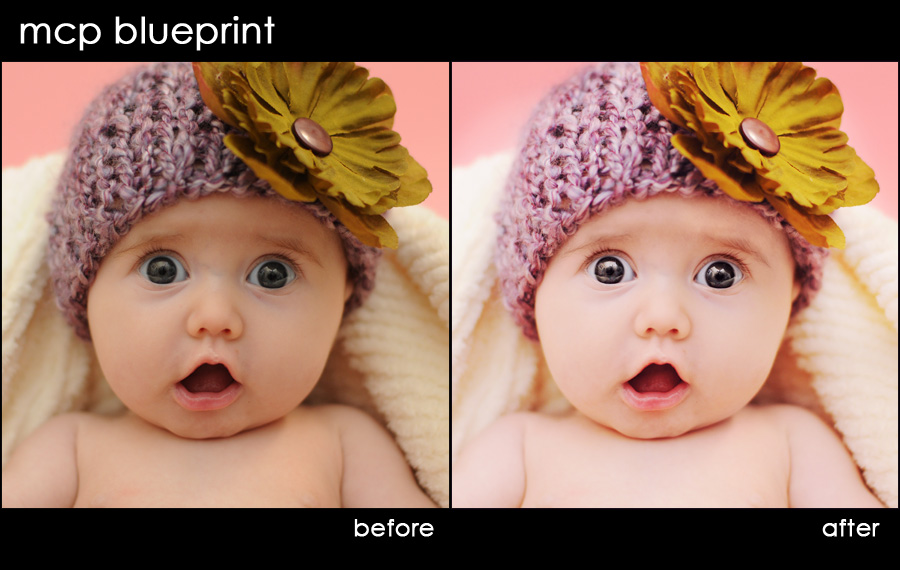
Shawnee of Photography by Shawnee sent in this before shot and wanted to see how I would edit it with the Bag of Tricks action set. I used both this set and the Eye Doctor to get to the after image.
I started with exposure. I used the Bag of Tricks – Magic Midtone Lifter. Then I used Magic Light on the face, hat and flower. Next I used Magical Contrast (Low).
After exposure and contrast, I decided to fix the color. I used the Magic See-Saw action first to correct the overall color. Then I ran the Reflected Color Cast Vanisher on a few spots that had a yellow cast (probably from the big flower).
Lastly, I used the Eye Doctor to brighten and sharpen those “big” eyes. This photo puts such a smile on my face. I just love the expression. I hope my steps can help you in some way.

No Comments
Leave a Comment
You must be logged in to post a comment.




















Recent Posts









Wow, Stacy…thanks for sharing…b-e-u-t-i-f-u-l…looks like you ROCK, too!
Truly beautiful!! Good work Stacy. Jodi’s tutorials rock!!
This looks great.
WOW! Thanks for sharing, I can’t wait to take the color correction class now…
Wow! It’s blueprints like these that make me think I could make my good shots outstanding. Thank you for sharing.
that’s ridiculously good. I need to take some of these classes!
Fab work Stacy!!!
How lovely! What a fantastic edit. Thank you so much for sharing with MCP fans.
WOW,that is fantastic,your tutorials are so good.
Wow! This is amazing!!!! Jodi- You should be so proud of what you do for the photography community of the world. You are an amazing resource for all of us learning this artform!
Wow, that looks wonderful! Great job, Stacy!
I totally agree Jodi rocks! Nicely done on the edit too.
Wow, that is a great blueprint and great testimonial. I’ve been debating the tutorial courses (only because I’m very new in business and watching every penny), and this truly helped me decide the courses are moving up on my priority list!
Oh….my…..goodness! You did a great job! I think I need to save up for a class =D You obviously were a good student with a wonderful teacher!
wow…amazing!
Thank You very much for this website – excellent!