
Featured Products
-
Sale!

-
Sale!

-
Sale!

-
Sale!

-
Sale!

-
Sale!

-
Sale!

-
Sale!


From Color to Black & White In Seconds Using Photoshop Actions
As many of you know, for the past 5 years I have offered Photoshop Training Classes online. I have both one-on-one and group style workshops. Occasionally I get asked to do in person mentoring and teaching for local hobbyist and professional photographers in Metro Detroit.
Tammy Miller, a mom who loves photography, just purchased Photoshop and had no idea where to start. She has been coming to my home office to learn Photoshop. In upcoming weeks, I will share a few images we have edited of her beautiful daughter.
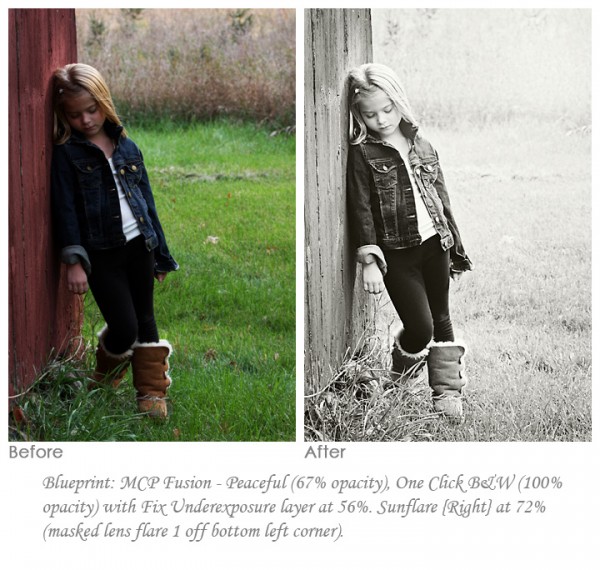
As soon as I saw this image, I knew I wanted to convert it to black and white to emphasize her serious facial expression. This edit took less than a minute using the MCP Fusion Photoshop action set.
I ran B&W Fusion Mix and Match, which runs all the black and white actions and allows you to turn them on and vary opacity for a fully customized look. I ended up just using Peaceful on this one at an opacity of 67%. The One Click B&W folder was set to 100%. I needed to fix the exposure so I opened the One Click folder and increased the Fix Underexposure folder layer to 56%. I masked the background back with a low opacity brush. Lastly I used the Sunflare {right} Photoshop action which mimics lens flare. I decided to use Lens Flare 1 from inside and to mask the circle off in the lower left corner. Then I set the opacity to 72%. That was my quick edit from the before to the after image shown below.
If you are interested in seeing how I edit your images using MCP products, consider taking our Watch Me Work group class or a one-on-one Photoshop training class.

No Comments
Leave a Comment
You must be logged in to post a comment.




















Recent Posts









Jodi, what BW conversion technique do you use for the Quickie Collection v. the Fusion Collection? Do you have a favorite? I’m debating which collection to buy. I have not been happy with the various BW actions that I’ve been trying (or my own BW conversions)…and am wondering if it’s the underlying technique that’s sub-optimal….so would love to be pointed to what and why. Thanks!Julia
Julia,I use so many techniques, depends on the specific action. Duotones, gradients, channel mixers, etc. My least fav is grayscale and also the PS B&W adjustment (for some reason I just never fell in love with it)…
Testing image upload!