
Featured Products
-
Sale!

-
Sale!

-
Sale!

-
Sale!

-
Sale!

-
Sale!

-
Sale!

-
Sale!


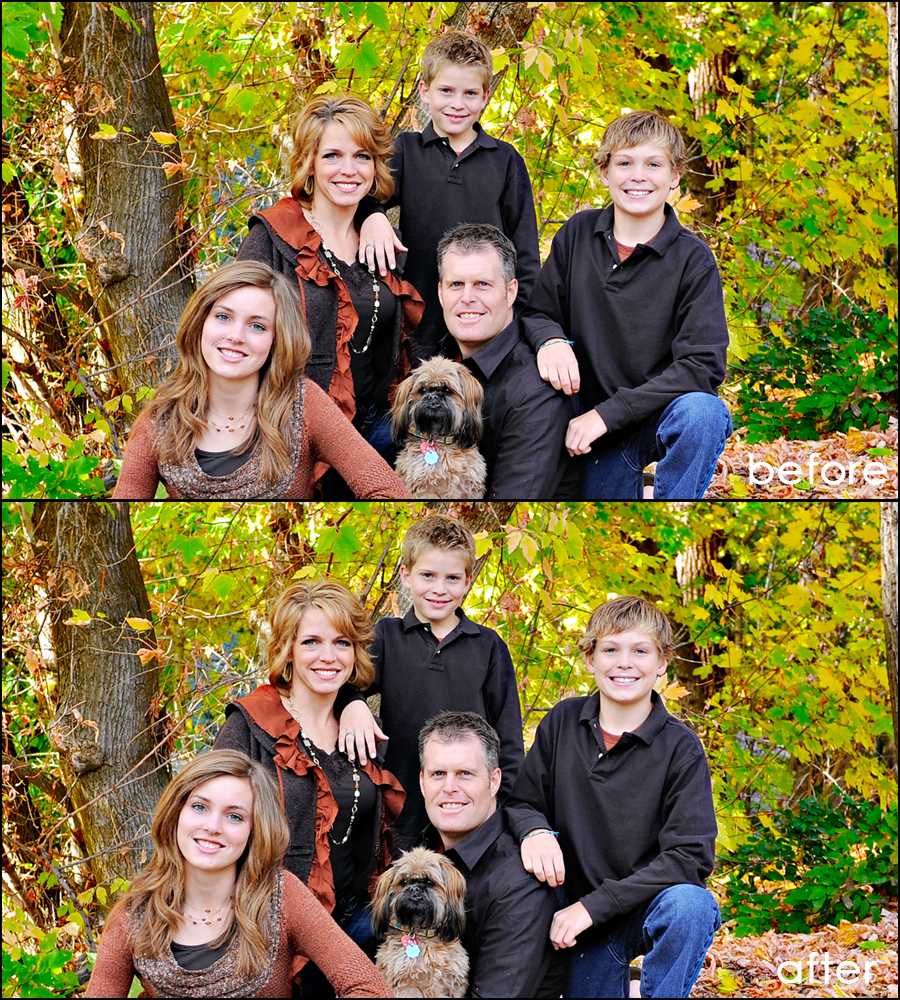
If you like bold, vibrant, color popped images, you will love this edit by MCP customer Kattrina Holt of Sassafrass Photo. She sent in this before and after step-by-step Blueprint edited primarily with Bag of Tricks and also the Free Photoshop action, Touch of Light/Touch of Darkness.
Kattrina opens her images in Lightroom and warms them up to her taste and then heads into Photoshop CS5 to edit using MCP actions. She went right to Bag of Tricks. her steps were as follows:
- Color finder vivid- default setting (over the whole image except for jeans and skin and hair)
- Color finder intense- at 33% – just went over the background colors this time
- Magical clarity Photoshop action at default ( she said she does this on every image she edits)
- Magical contrast both- medium & low on default
- Free Touch of light/dark Photoshop action: Light- 30% opacity brush over skin (especially their faces) then cranked it down to 75%, Dark- 30% opacity brush over the background.
Kattrina said, ” I typically uses MCP’s actions on every single edit I do! I LOVE them!!!”

No Comments
Leave a Comment
You must be logged in to post a comment.




















Recent Posts









Hey Jodi, I think i like #2 the best, i think the blue sky makes her stand out. as always, great editing. How did you do at the Mac store the other day? You decide on a Mac yet?
After all is said and done, I think I like the Pastel the best. It just seems to fit the mood of the photo. And it’s funny because I don’t usually go for the pastel looks, but this worked. Thanks for sharing, Jodi!
I love after #3!!
I love the last one with the border! Any chance you’d consider doing a step by step tutorial explaining how to create that effect with the sky? Thanks. I love your blog.
I love the last one! The pastels are beautiful and very lovely with the image!!
I like number 1 the best with the white sky she really pops out in the photo – I did like 2 also but the blue sky against the green grass competes with her for my eye’s attention – it has a great overall effect but I love how she is the total focal point in the first photo. It’s a amazing what small changes make to the overall photo. As always wonderful work Jodi.
LOVE the pastel. thanks for sharing =)
I like number one as they are….but I think number two would probably jump up on my list if (as Jodi stated) the blue in the sky was toned back down. Good job Jodi
I LOVE the pastel one………love!
I like “after 2.” The blue sky and green grass seem to say, for me, “I’m home” 🙂 Beautiful job Jodi!
I like the yellow sky surprisingly. I think if it was a little lighter, it would balance things out more. Nice!!
Ditto Martha. I love the pastel. It just fits. Thanks, Jodi.
The pastel look is one I’ve been seeing a lot lately, very popular and people seem to love it. Thanks for showing how you did it. Now I can try!
I like all the edits except for her skin/face. They look too washed out and her facial features practically disappear. I think if you take the unedited version and create a layer mask out of it, and place it under the edited layer, then using the eraser tool on about 40% opacity w/soft round brush and erase just her face and arms on the edited layer so that the unedited underlayer starts to show thru, that it looks better. I took a play with it on my computer and it looks better, to me, since she looks more tan and you can see her facial details better. Just my 2 cents. #2 and 3 are my faves, and I love the pastel.
I may need all of your actions now…slowly but surely!
I love after 2 and the pastel … you make it look so easy Jodi
i’m going to have to say the pastel on too! (although, i’d actually prefer it without the boarder)but i also love both the ones with the added sky. it makes such a difference!!
this was an awesome step-through, jodi! thanks! i especially appreciate the tip on adding the sky–believe it or not, i had never thought of doing that before! =P thanks again!
jodi,really like all of your plays on the image! i think my favorite is the pastel look because actions like that are so popular right now & i love how it brought the sky together with the rest of the image.i have a question about sandi’s tutorial that i was wondering if you can answer:i am seeing the terms “saturation brush” or “desaturation brush” and can’t figure out what this is supposed to be…i haven’t seen or heard you use that term in any of your tutorials. maybe i know what this is but haven’t heard this particular term?any help?thanks jodi!
All three are great, but because of her face/skin, I think the pastel version is best. Her face did lose a lot of detail, but I like the blue sky much better than the white, and the golden sky looks good too. Often those colorized versions are not my thing, it’s only when you get the right image that I think it works. I guess this is the right image! Thanks for this. It’s interesting to see different plays and also to hear the various comments which are definitely not skewed in any particular direction! Go figure.
I LOVE ‘after 2’….gorgeous!
I think the face did lose too much detail. It needed to be a little darker. The blue sky is a little too overdone for my taste. I like #3 better. However, I think the pastel is great for this pic. I like lots of color normally, but the pastel just suits this pic so well. Thanks for all the options. Thanks for teh sky tip. I can’t wait to try it.
#2 is my fave … the blue looks great! My second fave is the pastel … I think that would look great with some texture too!
I kind of like the blue sky. Her skin looks almost too perfect. Maybe that is just a wierd thing I am thinking though. I love the picture. VERY cool!
I would have never thought pastels could look that good! I have really enjoyed using that extreme color action!
Just wondering if there is a good way to avoid the halo around her arms? She kinda looks like she is glowing. lol I get this sometime…do you have any advice?
Yes – you can if you take the time to zoom way in with a harder brush and mask back when the change occurs. There was actually a light halo in the original – but the fast editing I did made it more pronounced. I could have avoided it if I spent a lot more time at pixel level editing.