
Featured Products
-
Sale!

-
Sale!

-
Sale!

-
Sale!

-
Sale!

-
Sale!

-
Sale!

-
Sale!


The MCP Quickie Collection Photoshop action set is known for crisp, color popped images and ease of use. These actions stack nicely in layers and give you the ultimate in control over your images.
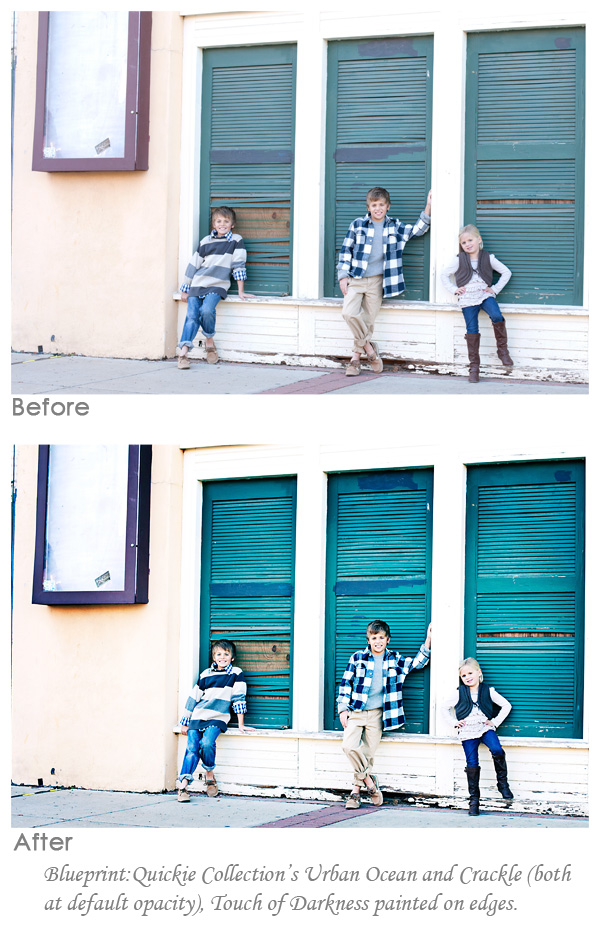
For this photography below, sent in by Spanki Mills Photography in Texas, I used a lesser known action from the set to start: Urban Ocean. This action alters and intensifies the blue and green colors in your image without drastically impacting skin tones. It also brightens the midtones for and adds contrast. For added midtone definition, I ran the most popular action from the Quickie Collection – called Crackle. Many say this action alone is worth the price.
To add a finished look to the image, I used the Free Photoshop action Touch of Light/Touch of Darkness. I only used the darkness layer and painted on the mask with a low opacity brush (set at 30%). I painted around the edges of the photo and also a bit on the greenish blue shutters to give them depth.

No Comments
Leave a Comment
You must be logged in to post a comment.




















Recent Posts









Wow. Great color effects.