
Featured Products
-
Sale!

-
Sale!

-
Sale!

-
Sale!

-
Sale!

-
Sale!

-
Sale!

-
Sale!


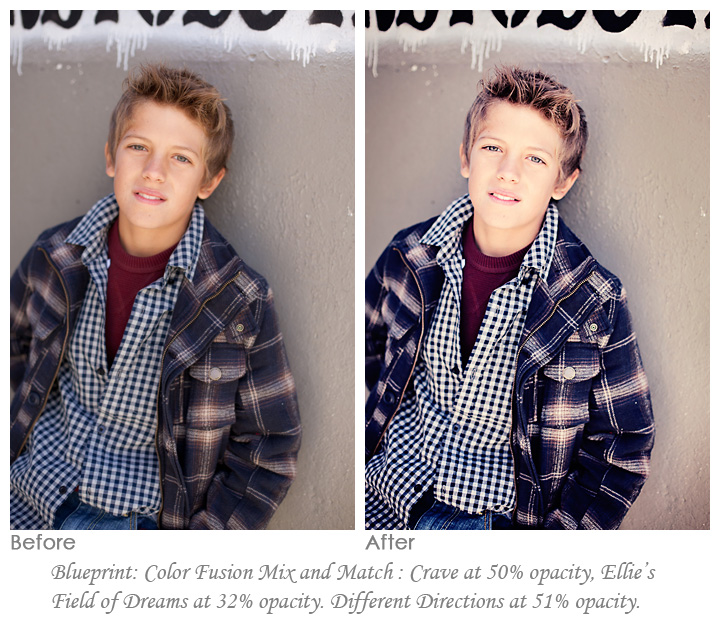
Many times in my weekly Blueprints I tend to show extreme edits, artistic looks, or rich color popped before and after images. In reality though lighter editing is usually the most powerful for photographers. In today’s step-by-step Blueprint, I used two Photoshop actions from the MCP Fusion Photoshop actions set to achieve a clean, crisp post processed image.
Thank you to Spanki Mills Photography for allowing me to use your photo for this edit.
I started with Color Fusion Mix and Match – this action runs more than 20 color actions in the set at once and you get to pick which you want to use and at what opacity. I turned on two layers, plus the default One Click Color. I left Crave at 50% opacity and tweaked Ellie’s Field of Dreams to 32%. Next I wanted a little contrast so I used Different Directions at 51%. That was it – simple, creamy, crisp and ready to deliver to your customer or print at your photo lab.

No Comments
Leave a Comment
You must be logged in to post a comment.




















Recent Posts









Hi Jodi! I must say, I love seeing the before & afters! You are right in saying that it’s the subtle differences that make a huge impact on your photo. I’ve taken a few photoshop classes at my local college so I have a basic understanding of photoshop, but I’ve never tried purchasing actions before and using them. I mostly use lightroom & feel comfortable with that, but I really like the results you get from your actions. My problem I guess would be, when I’m looking at the photo, how would I even know where to begin? How do you go about choosing which actions you are going to use? One day I’ll take the plunge & finally buy some actions because I love the results. Thanks for your time & keep the photos coming…especially the before & afters…LOVE them!!Lisa
Really love the difference. That’s exactly what I’m looking for, a little punch that really makes the image shine. Very nice!
Love the edit, but what is “different directions”? What set is it in and what effect does it have?
Please disregard my last comment! I looked closer at my Fusion set and I see it! Also to answer the other question… it adds contrast! My apologies!
Hey Jackie, I was not able to find the different directions, which set is it in?? Thanks!
That is part of the Fusion Set.
LOVE this…
Love the difference. It look awesome!
Perfect…LOVE this edit Jodi! 🙂
Just wondering how your studio white bright spell actions works. Do you make selections or what? Thinking of buying your bag of tricks.
check out the video to see it in action. It works well as long as the subject is not also wearing white or if hair or skin is overexposed, etc.