
Featured Products
-
Sale!

-
Sale!

-
Sale!

-
Sale!

-
Sale!

-
Sale!

-
Sale!

-
Sale!


Today’s before and after Photoshop Blueprint was sent in by Erin Niehenke Photography – she has only been using Photoshop for a few months.
Along with sending me her images she wrote, “I have been working hard at learning how to edit pictures, and your actions have made it so so so much easier and way better than I could have ever learned to do myself. I cannot thank you enough. It also gives me a great deal of confidence to know that this edit was a good one! Again, thank you!”
Below is her edit, and a list step-by-step of what she did. This is impressive work from someone so new to Photoshop!
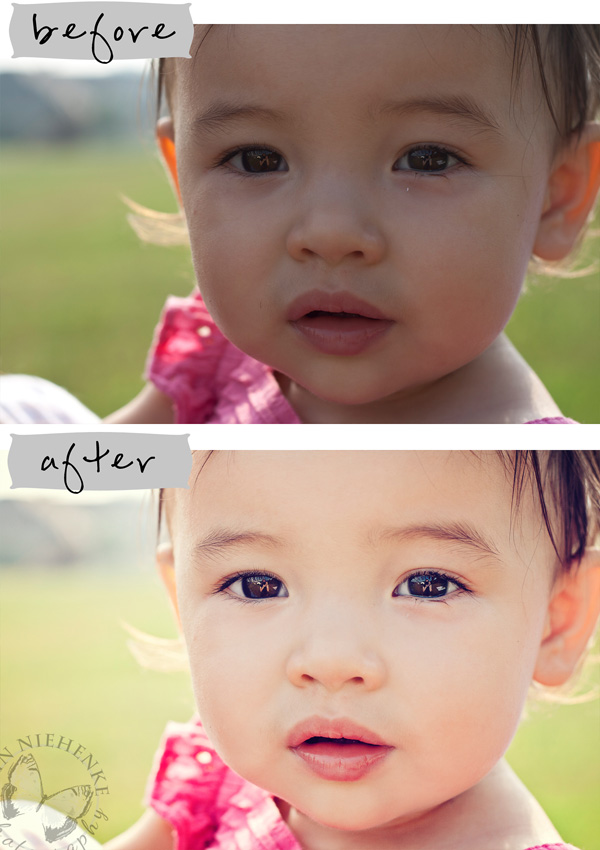
Before and After Blueprint for this edit:
- Opened image in Photoshop’s RAW editor (Adobe Camera Raw) – increased exposure slightly, as well as blacks, fill light, and clarity.
- After creating a duplicate background layer, used the patch tool to remove the white speck under her left eye, a stray hair under her right eye, and the horizontal hair under her left eye.
- Used a brush at 15% opacity, colored matched to her skin, to smooth out her skin a small amount.
- Used the patch tool at a low opacity brush set to “Lighten” mode to remove some of the yellow tone the sun caused in her ears.
- Flattened the two layers.
- Ran the Color Fusion Mix and Match Photoshop action (MCP Fusion Set), using Desire at 39% and Lemonade Stand at 25%. Increased the “Brighten It” layer inside One Click Color to 68% to brighten up to underexposed image.
- Ran Exact-o-Sharp, (MCP Fusion Set) and painted it on with a 50% opacity brush on her eyes and mouth.
- Ran Dodge Ball (MCP Fusion Set) and painted it on with a 10% opacity brush on the light parts of her eyes.

No Comments
Leave a Comment
You must be logged in to post a comment.




















Recent Posts









I love this series!!!! And this was a wonderful article that I absolutely needed. I am in the process of raising my prices significantly (they are SOOO low). And I am absolutely terrified. I have had a lot of very happy clients, but things have been slow lately. Which makes it hard to think about raising prices! It is nice get confirmation that it will take time (although why do some photographers seem SO busy so quickly??).Here is a question though. Aren’t there some photographers or some photographers in specific markets, that really are charging too much? There are some people who honestly just don’t have the talent. Isn’t that true? And yes, I often wonder if I am one of them…..
Focus on those around you. It won’t take long before your head is clear again and you are creating work that comes easy, genuinely, and from the heart.This is SUCH great advice Jess!BTW: I LOVE that maternity shot! Adorable idea 😉
I think this is the hardest part sometimes, at least for me. I begin to doubt myself because I’m not out shooting up a storm for clients. Sometimes we all just need to be remided to believe in ourselves.
Thanks, Jessica! This was very encouraging!
Another very nice article. I really enjoyed this series. Thank you for sharing and inspiring. It is so important that we “do” and “be” us. The tip about taking a break from other blogs, email & business was so true. I know for me, I am realizing that when I look at too many other photoblogs for too long…that very subtly…I start to forget what I like about the composition of my own images. Those things that define “me” and “my” style. Thanks again for the reminder. I don’t want to do anything that is not genuine. When God made me…& others, he broke the mold after each one. That was definitely intentional!
Thank you! I needed this right now. 🙂
This is definetly where I struggle. Thanks for such a great article Jess!
modern, fresh, fun
Thanks for all the great articles!! Just what I need.
“Because your phone is not ringing off the hook does not mean your prices are too high or your art not good enough. Be patient. It takes time. “i think this is why i hesitate so much… think i’m doing something wrong???. thank you so much! great advice.
I really needed to read this today….. Thank you!!! Great series!
great series – thank you!
I have really enjoyed your series, but mostly this article! I know I am way to over critical and doubtful of myself and really need to heed your advice. Thank you for all of your advice and insight!
Thank you!!!!! I so needed all this brillant and wise insight!
THree words to describe my business:ExcitingFunfilledNeeds advertising help!Not good with setting up blogs, etc. Desperately need help to get the marketing thing going!I am already a fan of MCP, have re-tweeted and posted on my Facebook page for extra entries!
I love reading this! I think a lot of new photographers don’t believe in themselves and their worth enough. I haven’t even started a business yet, but know that when I do I will believe in myself first and foremost, or it will never work! Thanks again for doing this series:)
Thank you so much for these posts, Jessica. They couldn’t have come at a better time for me. I’m totally bookmarking them for future reference. But I must say, I’ve learned more from these past few posts (and their subsequent references/links) than all that I had about the photography business prior. Thank you, thank you, thank you.
Where do you go for inspiration?
Jessica,Thanks so much for posting this. I just stepped away from my corporate job of 9 years and today is my first day as a FULL time photographer! It is scary but when you shine a light on your fears and have confidence in yourself it becomes a lot easier. I’m excited to be my own boss and to enjoy what I do everyday, it’s crazy how much happier I am already! There are a lot of unknowns but I’m excited for the new adventure.This was a great article for me to read this morning and very encouraging on the first day of my new career.Thanks so much!~Jill
THANK YOU SO MUCH FOR THIS! I REALLY NEEDED IT TODAY!!!!!
I just stumbled on this series. Thanks so much for all the fabulous info! Lots to think about…
By far one of THE BEST series for aspiring professional photographers that I have read! Great job Jessica and thanks MCP for featuring her in this series 🙂
I just read the entire series. THANK YOU. It was a simple way of outlining what can be so daunting to an aspiring photographer. It gave me a little boost of confidence and paved a clearer path to take.
Thank you for taking the time to write this series! It was very inspirational to me.
I loved this series!I’m there right now – working through the tough questions from family and friends about pricing and still plowing through the portfolio building period. I’m on a 3 year transition from full time paralegal/part-time photographer to full time photographer.I’d love for the transition to be shorter – but patience is a virtue! Thank you for sharing your experience!