
Featured Products
-
Sale!

-
Sale!

-
Sale!

-
Sale!

-
Sale!


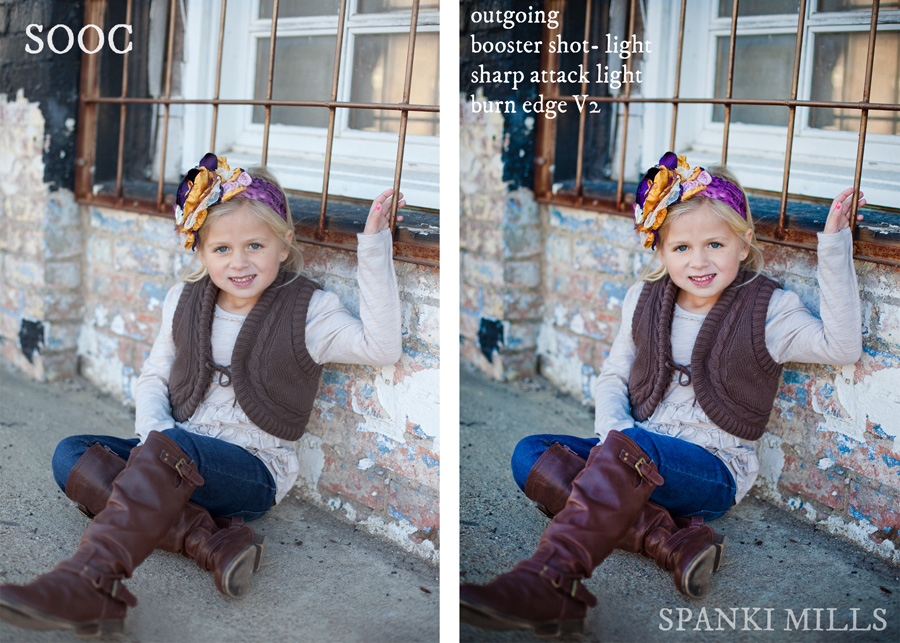
Spanki Mills of Spanki Mills Photography was out of town with her laptop and had limited images to edit. She started playing around with our Lightroom Presets and here are some of her results and her steps to achieve the after looks.
Here are the Lightroom presets she used from the Quick Clicks Collection – in this before and after “Blueprint.”
- Outgoing
- Booster Shot Light
- Sharp Attack Light
- Burnt Edges v2
Literally four quick clicks to enhance her image!

No Comments
Leave a Comment
You must be logged in to post a comment.




















Recent Posts









nice. This is the style of editing I enjoy. Subtle, yet obvious when side by sided. well done
I agree with Ryan above… the overly warm tones that is a trend right now is getting a big tiresome. I LOVE the subtle pop added to the above image. It actually ENHANCES the image rather than detract from it… almost resembles what comes from the Fuji Super CCD SR II sensor SOOC.
Love the Lightroom presets, especially because you can make adjustments to the settings and get just the look you want!
Ditto Jeanette! LR is one of my favorites for quick editing.