
Featured Products
-
Sale!

-
Sale!

-
Sale!

-
Sale!

-
Sale!

-
Sale!

-
Sale!

-
Sale!


 Several years ago, Jo Ann Kairys, an award winning children’s book author and illustrator, began taking photos of her grandchildren at play. As a novice Photoshop CS3 user, she created story book images into which she blended their pictures. She had no formal art training, but with digital scrapbook kits purchased online, she constructed colorful illustrations. She didn’t know at the time that it was called digital collage: “. . . the technique of using computer tools in collage creation to encourage chance associations of disparate visual elements and the subsequent transformation of the visual results through the use of electronic media. It is commonly used in the creation of digital art.” (Wiki)
As she graduated to CS5, the digital collage results grew more intricate. In this tutorial, she will walk through 5 key steps involved in creating an illustration from one of her books – this illustration is called, “Classroom Scene.”
Her book Sunbelievable: Connecting Children with Science and Nature is available HERE.
Jo Ann’s Step-by-Step Illustration:
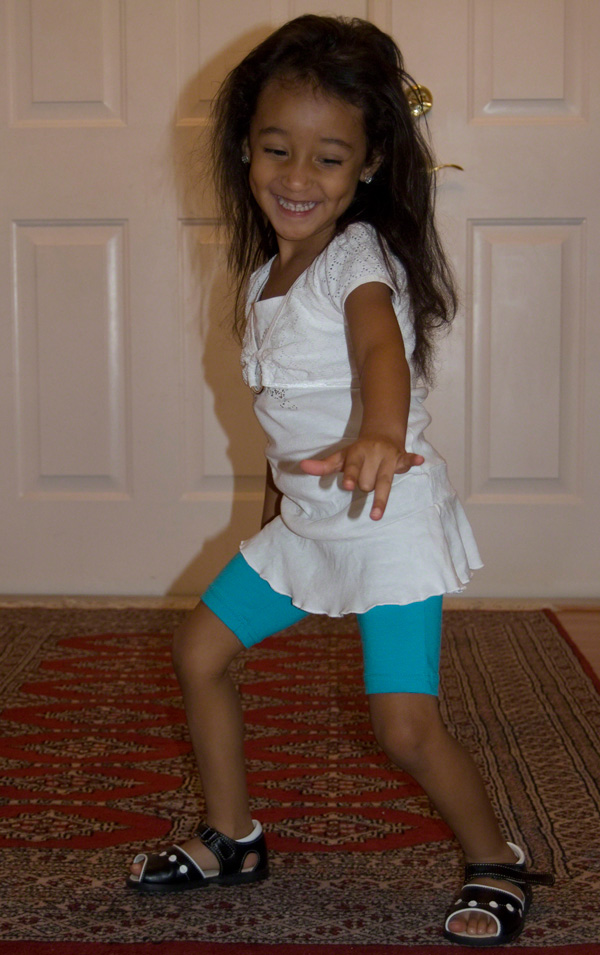
Step 1: “Classroom Scene” began with this original photograph of a featured character, “Leen.” She was not posed, and the lighting was tricky, but I loved the expression on her face and knew it would fit into an idea I had for one of the story pages.
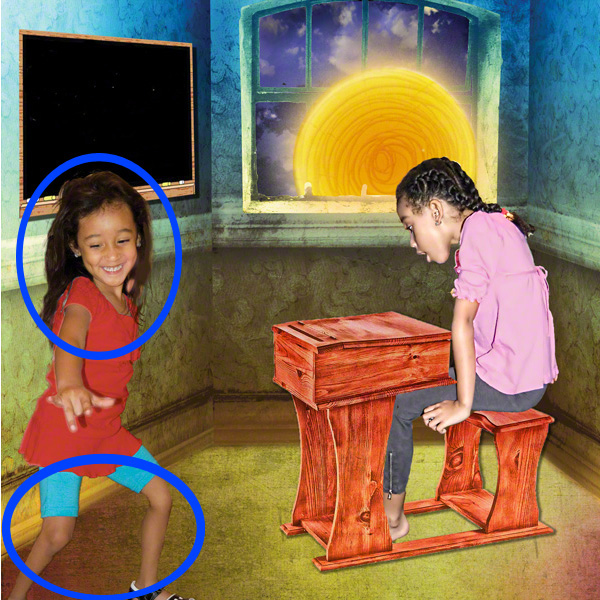
Step 2: Extracted “Leen” from the original photograph and placed her in a classroom setting. The classroom scene is part of a downloadable graphics kit, “Flying Dreams Story Book Collection” that I purchased online from Scrapbook Graphics. Digital scrapbook companies stipulate whether kits and/or graphic elements can be used for commercial purposes (such as for creating logos) at no additional cost, or if an additional fee is charged to acquire a commercial use license. Licensing policies vary, and are described on individual companies’ websites. I was granted written permission (i.e., signed contract) to use the Flying Dreams kit created by digital designer, Lorie Davison. Make sure if you use design elements or background art for this purpose, that you adhere to their terms.
I used Photoshop’s magnetic lasso tool for extracting “Leen” from the original image, but achieved less than an optimal result, with ragged edges, as shown in the blue outlined areas, below. Once extracted, the ragged edges were corrected with the Smudge tool and a soft round pressure opacity, built-in Photoshop CS5 Brush, size 54px at 79% opacity. The photo was lightened using Photoshop’s Brightness/Contrast adjustment layer. To change “Leen’s” shirt color, I selected the shirt and applied a Hue/Saturation adjustment layer. At this point, the background image contained only basic elements of the final illustration.
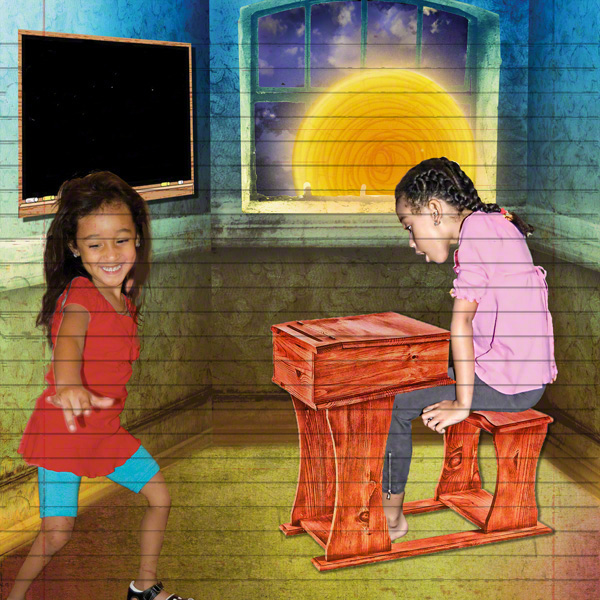
Step 3: Experimented with an textured appearance, using MCP’s Free Texture Applicator Photoshop Action. I scanned notebook paper and made it a .jpg image to use for the texture action. The first “stop” in the action achieved an interesting classroom overlay effect with Vivid Light blend mode at 7% opacity. As the action continued to run, other blend modes produced varying degrees of contrasts and opacities. I liked the “soft” appearance of the Vivid Light setting on the first “stop.”
In Step 3, however, I used the image without the overlay to build additional elements for the classroom.
Step 4: Added and enhanced digital elements: Sun rays, classroom items, “bare fireflies.” I used a Wacom Intuos Tablet 4 to create the stretched, “leggy” appearance of a personified Sun who teaches fireflies to shine. New digital elements were introduced to give the room character and interest–desk, chalkboard text, school books, etc. To give the illustration even more visual appeal, I created fireflies as classroom “students.”
The digital challenge was creating each firefly. A soft round brush and the External Glow blending mode allowed me to “build” the flies’ depth and dimension, as shown in Step 5.
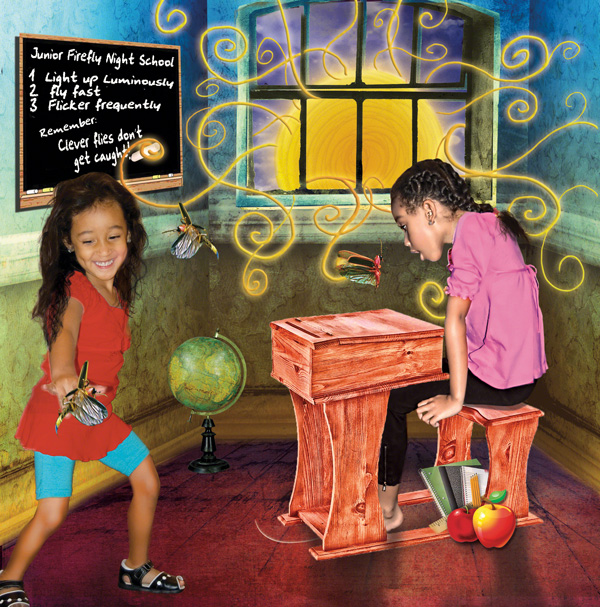
Step 5: Made fireflies that glow. To achieve the glow effect surrounding each firefly, I used a soft round, built-in Photoshop CS5 Brush on multiple layers (shown in orange on the layers panel below) and chose the Outer Glow blending mode to develop a natural-looking shine around each fly.
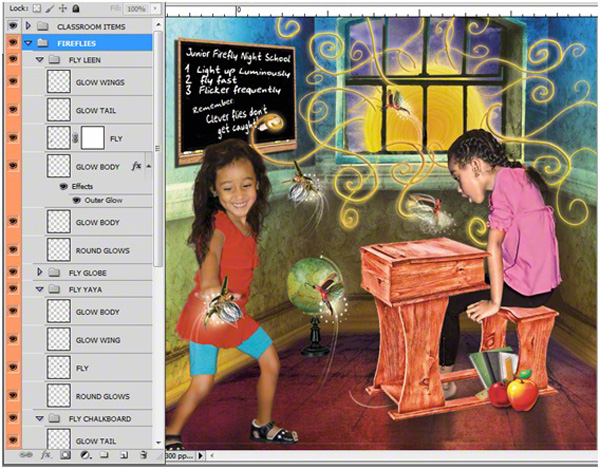
This tutorial demonstrates how I used the digital collage technique to create a story book illustration called, “Classroom Scene.” I found that combining realism (actual photographs) and fantasy (digitally created scenes) produced a vibrant, magical effect perfect for storytelling. Experiments with Photoshop actions, as shown in Step #3, offered even more intriguing ways to make the images unique.
Jo Ann Kairys is an award winning children’s book author and illustrator, with co-author Daniel Kairys, and co-illustrator, Frank Thompson. As a young child, she loved the bright images in picture books and learned to create stories and colorful digital scenes for her grandchildren. Her website is http://storyquestbooks.com where she blogs about all aspects of children’s books. All images in this article are © Jo Ann Kairys 2011.





















Recent Posts








