
Featured Products
-
Sale!

-
Sale!

-
Sale!

-
Sale!

-
Sale!

-
Sale!

-
Sale!

-
Sale!


If you are looking for rich colors in fast, without the use of Photoshop actions, try using blend modes in Photoshop. The after image used two “fake” or empty adjustment layers set to blend modes of soft light and multiply. Watch our included Photoshop video tutorial below to learn how we did it!
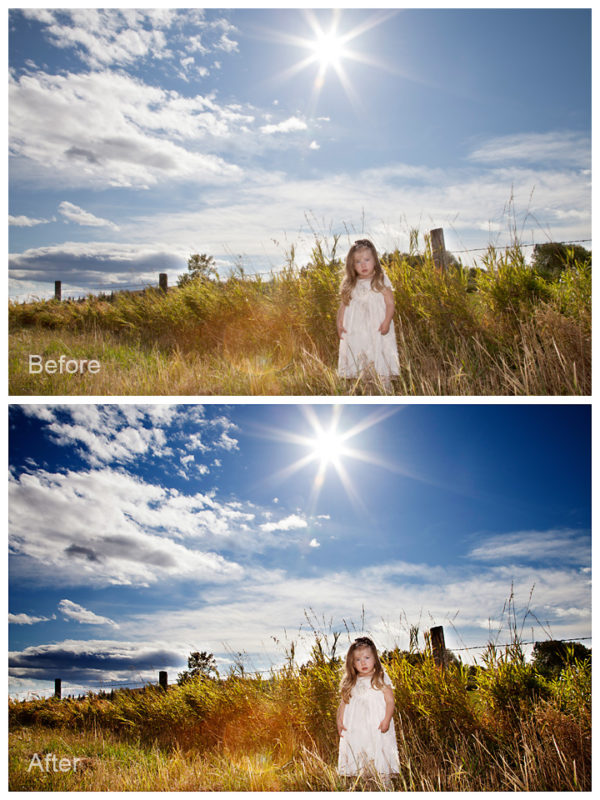
Image taken by Nadia Larsen, a hobbyist photographer

No Comments
Leave a Comment
You must be logged in to post a comment.




















Recent Posts









Very cool Jodi! I will try this out –
Excellent!
You are awesome! PS I your updated pic of yourself! 🙂
Hey Jodi, This is my 1st visit to your blog and I just want to say after visiting this blog, one thing and that is “Wowwww” — nothing else. Great snap editing video – high resolution with great use of lights and exposure. As being a photographer I just loved your blog. Keep it up mate. 🙂
I used to use blending modes all the time!
Great tip – thanks!
I love your site. This is another great example of why 🙂 thanks for sharing.
Great tuitoral! Going to try this now! Thanks, Jodi!